When selecting a replacement stepper motor for a 3D printer, one of the most common issues is a mismatch between the motor's wiring configuration and the control board's pin assignment. This guide will help you choose the correct motor and avoid wiring problems.
Before You Order
-
Provide the original motor specifications. Provide the datasheet or technical drawing of the original motor for the most accurate recommendation. If unavailable, provide the motor's dimensions (including shaft specifications) along with clear photos.
-
Verify the pinout. Confirm whether the pin assignment of the motor connector on your control board matches the wiring configuration of the motor you intend to purchase.
-
Request a custom pinout if needed. If you find that the standard wiring configuration does not match your control board before placing an order, contact us to customize the connector pinout to your requirements. You will need to provide the pin assignment of your control board.
Understanding Control Board Pin Labels
We have selected several control boards with different pin labeling conventions to illustrate. At the motor connector on the control board, you will typically find markings such as "2B 1B 1A 2A" (different printer brands use different labeling conventions). These markings indicate the pin assignment for the motor.
WARNING: Using the figure below as an example, you must verify which motor coil wires (A+, A-, B+, B-) correspond to each of the four pins labeled "2B, 1B, 1A, 2A" on the control board. Incorrect wiring can cause the motor to malfunction and may permanently damage both the motor and the driver board.
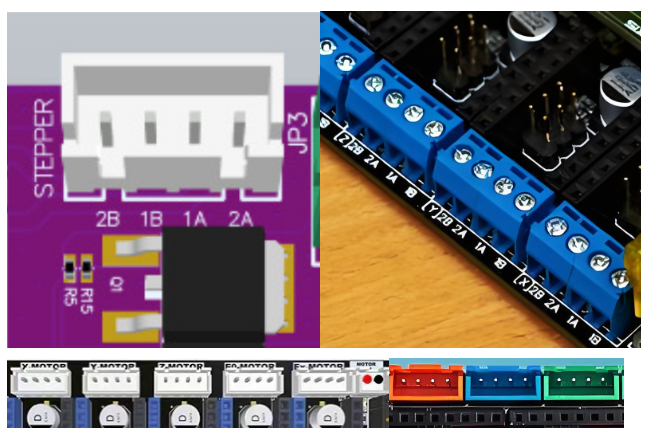
For example, STEPPERONLINE motors typically use the following wire color code: Black (A+), Green (A-), Red (B+), Blue (B-). If the control board pins labeled 2B, 1B, 1A, 2A expect the sequence A+, B+, A-, B- respectively, connecting the motor directly will result in a phase mismatch. The motor will stall, vibrate, and fail to rotate. In severe cases, the motor windings or driver may be damaged.
The following table shows how the same motor wires map to different pin labels on two example control boards:
| Motor Wire Sequence | Black(A+) | Green(A-) | Red(B+) | Blue(B-) |
|---|---|---|---|---|
| Control Board 1 | 2B(A+) | 1B(A-) | 1A(B+) | 2A(B-) |
| Control Board 2 | 2B(A+) | 2A(A-) | 1A(B+) | 1B(B-) |
NOTE: Different control boards use different pin labeling conventions. Always consult your control board's documentation to confirm the correct pin assignment before connecting the motor.
Troubleshooting Wiring Mismatches
If you find that the motor's wiring configuration does not match your control board's pin assignment, use one of the following solutions:
- If the motor leads do not have a connector, rewire them to match the correct pin assignment of your control board.
- If the motor has a connector, you can use four individual wires: insert one end into the connector housing according to your control board's pin assignment, and connect the other ends directly to the control board. Alternatively, remove the existing connector and rewire the motor leads to match the correct pin assignment.
Insulation Class
Confirm the insulation class required for your application. Some 3D printer motors require an insulation class of Class H (temperature resistance up to 180°C). Our standard motors use Class B insulation (temperature resistance up to 130°C). If your application requires Class H insulation, we recommend our [high-temperature motors](https://www.omc-stepperonline.com/special-stepper-motor?mfp=276-product-type[High Temp Stepper Motor]).
Customization
If you cannot find a motor that meets your requirements on the STEPPERONLINE website, please contact us. We offer full customization services, including motor size, current rating, insulation class, connectors, and more.