Please follow the steps below to connect the brushless driver to an Arduino:
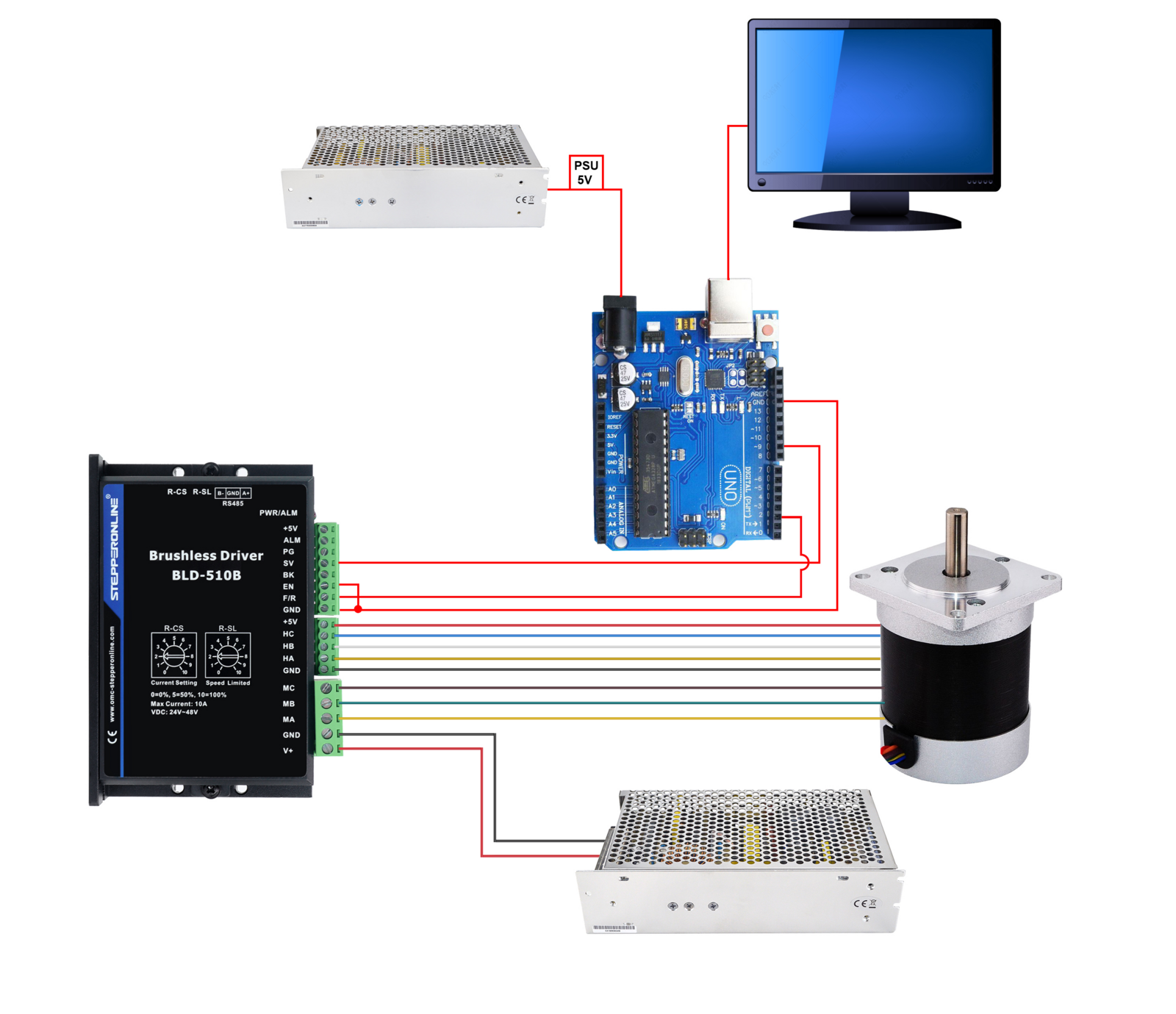
- Connect the SV (speed/PWM input) and F/R (forward/reverse direction) pins of the driver to the Arduino's digital pins. For example, connect SV to PIN9 and F/R to PIN2.
- Connect the GND pin of the driver to a GND pin on the Arduino.
- Connect the EN (enable) pin of the driver to GND to enable the driver.
- Upload the sketch to the Arduino. Connect the driver's main power supply (as specified in the driver's datasheet) and power the Arduino via its 5V supply or USB.
The schematic below shows the basic connections for the Arduino, brushless driver, power supply, and brushless motor.
Below is an example of Arduino code that makes a motor run forward for 5 seconds and then reverse for 5 seconds. This code works by using a digital pin to set the rotation direction of the motor, while a PWM signal controls the speed.
const int pwmPin = 9;
const int directionPin = 2;
const int speed = 255;

void setup() {
  pinMode(pwmPin, OUTPUT);
  pinMode(directionPin, OUTPUT);
}

void loop() {
  digitalWrite(directionPin, HIGH);
  analogWrite(pwmPin, speed);
  delay(5000);

  analogWrite(pwmPin, 0);
  delay(1000);

  digitalWrite(directionPin, LOW);
  analogWrite(pwmPin, speed);
  delay(5000);

  analogWrite(pwmPin, 0);
  delay(1000);
}
In this code, digitalWrite is used to set the direction of the motor, and analogWrite is used to control the speed of the motor. HIGH and LOW are used to control the direction pin, thereby determining the direction of rotation. The duty cycle of the PWM signal is set by the speed variable, which can be adjusted to change the speed of the motor.
For practical applications, make sure your motor driver and Arduino board are compatible and follow all safety guidelines. If your motor driver requires different control signals or has special wiring needs, please adjust the code accordingly.