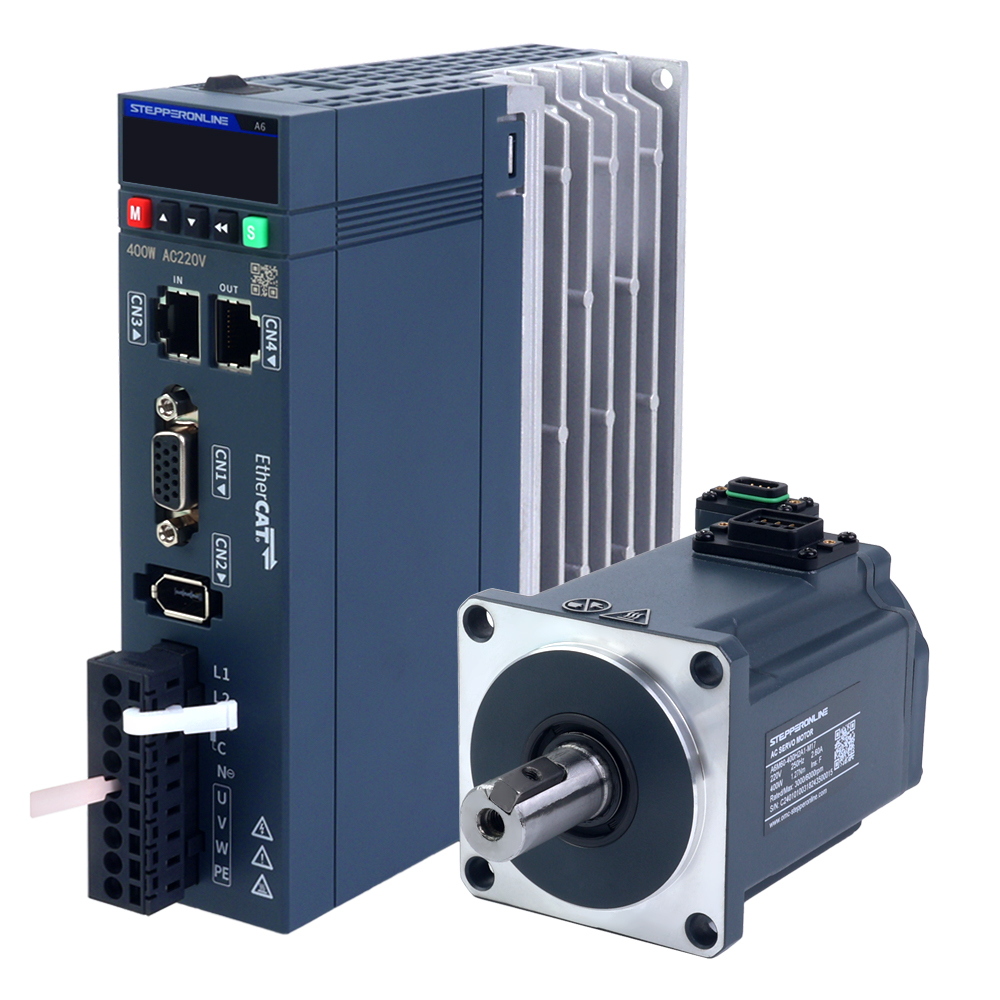
The absolute positioning function enables a servo motor to accurately recognize its current position (absolute position) immediately after a power loss or restart, without requiring a return to a reference origin. The core hardware foundation of this function is the absolute encoder. All A6 series servo motors are equipped with a 17-bit absolute encoder. To use the absolute positioning function, a dedicated cable with a battery box is required, as shown in the figure below:
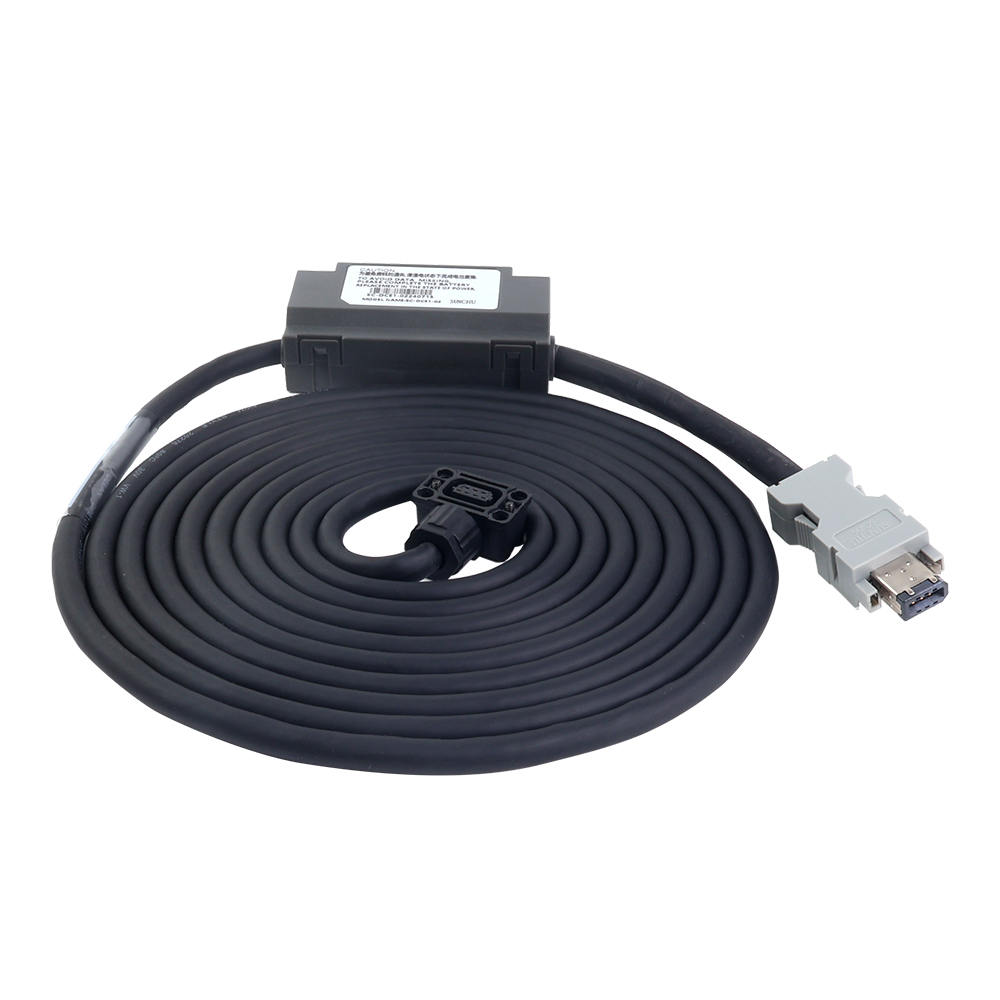
The battery serves as a backup power source for the motor's encoder. The encoder requires continuous power to maintain position data. When the servo drive is powered off or restarted, it cannot supply power to the encoder. Therefore, adding a battery to the encoder cable is the optimal solution to ensure that position data is not lost. This acts as an independent backup power supply.
Note: If the absolute positioning function is enabled using a standard cable without a battery box, the servo drive will trigger an alarm.
1. Instructions for Enabling the Function
- Connect the servo motor and servo drive using the encoder cable with a battery box.
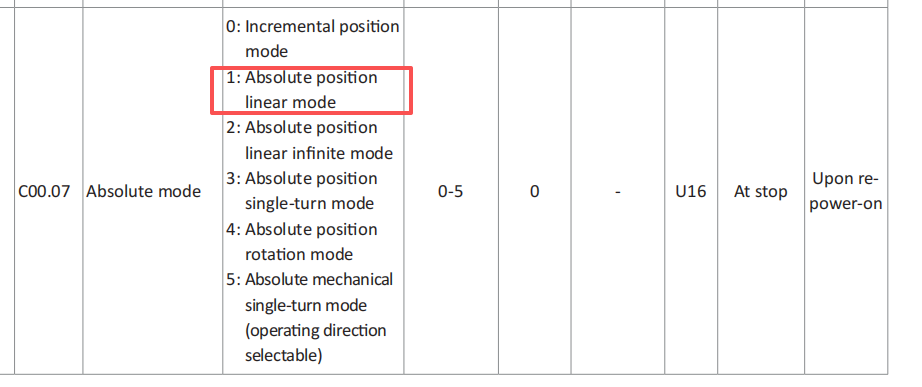
- Configure the servo drive parameters. The A6 series provides five absolute positioning modes, which can be selected based on your application requirements:
- Absolute Linear Mode: Maps the multi-turn absolute position of the encoder linearly to a preset linear stroke. Suitable for linear reciprocating motions such as linear modules, slides, and gantry systems. The encoder's multi-turn absolute data changes within a fixed range without the risk of position overflow.
- Absolute Linear Endless Mode: Suitable for scenarios where the motor rotates continuously in one direction. Position data accumulates indefinitely, and the servo drive will not trigger position overflow alarms.
- Absolute Encoder Single-Turn Mode: The simplest absolute mode. This mode does not record multi-turn data; it only retains single-turn position information. Suitable for applications where the motion range does not exceed one full rotation, such as robotic arm joints, rotary valves, angular positioning stages, and indexing tables.
- Absolute Rotary Mode: The standard and most commonly used multi-turn absolute mode. Each encoder value uniquely corresponds to an absolute mechanical position of the motor shaft. Suitable for most rotary applications requiring full absolute positioning, such as robot joints, CNC tool changers, rotary worktables, and winches.
- Absolute Mechanical Single-Turn Mode: Designed for applications requiring extremely high positioning accuracy within a single rotation, where position loss after a power failure is not acceptable. Examples include high-precision indexing tables, precision valves, and radar pitch mechanisms. Similar to the Absolute Encoder Single-Turn Mode, this mode is more reliable because the servo drive actively ignores turn counts. If the motor rotates beyond one full turn, the feedback position wraps around within a single rotation (modulo operation), preventing erroneous values such as 361° and thereby ensuring greater system stability.
The following steps demonstrate configuration using the software tool. The same procedure applies when using the servo drive's front panel or other configuration methods.
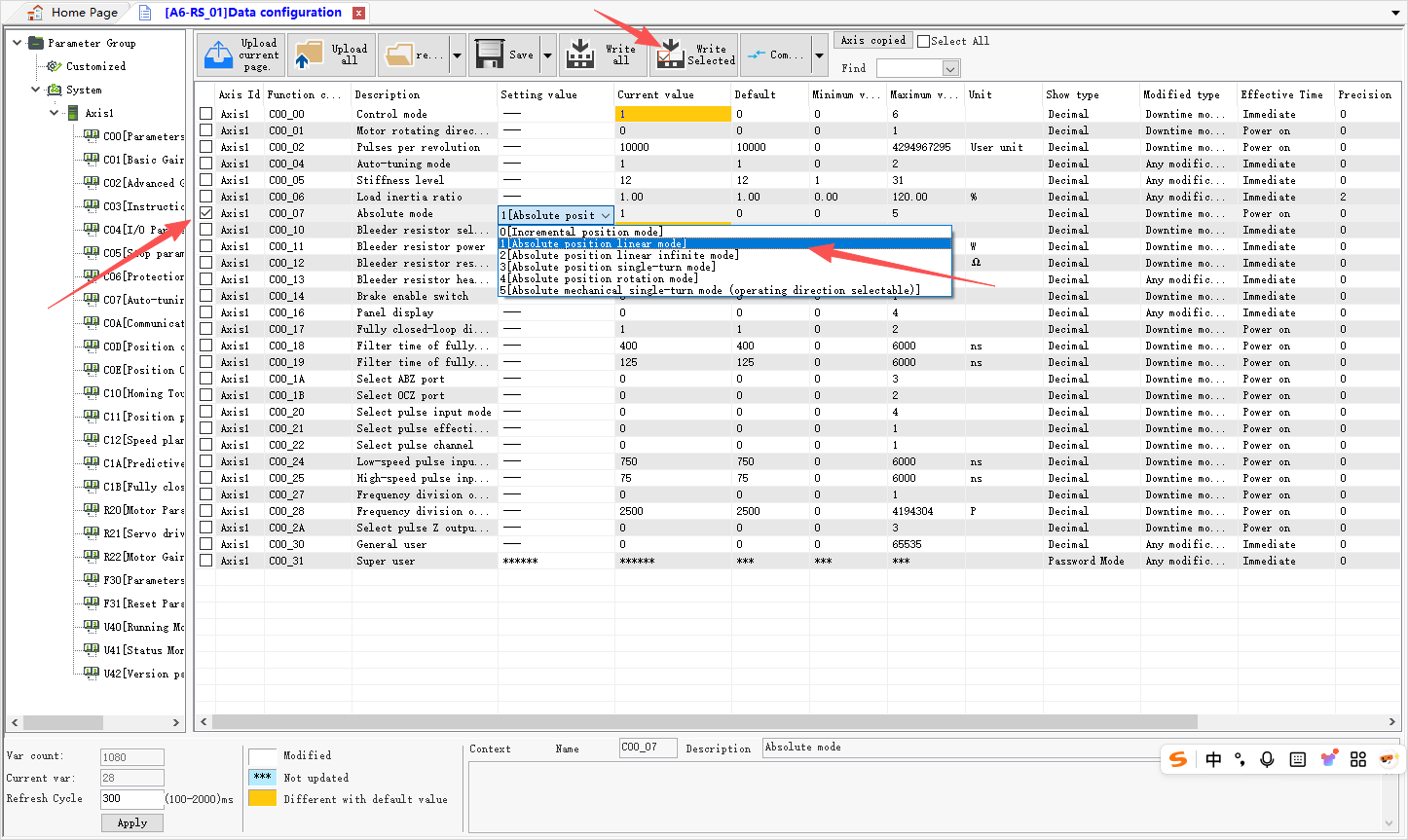
- Open the C00 group configuration parameters.
- Locate C00.07 and select the desired absolute positioning mode.
- Save the settings.
After saving, power off and restart the servo drive for the absolute positioning function to take effect.
2. Explanation of Absolute Positioning Parameters
First, review the parameters in the servo drive's U40 group related to the encoder:
- U40.16 (Absolute Position Feedback (Command Units)):
Displays the total motor position in command units, which is related to parameter C00.02. For example, if C00.02 = 10,000, the motor completes one full rotation per 10,000 command units. Parameter value = motor rotation turns × 10,000.
- U40.18 (Absolute Position Feedback (Encoder Units)):
Displays the total motor position in encoder units, which is related to encoder resolution. For example, with a 17-bit encoder, the motor completes one full rotation per 131,072 encoder units. Parameter value = motor rotation turns × 131,072.
- U40.1C (Encoder Single-Turn Information):
Determined by the encoder hardware. As described above, one motor rotation corresponds to 131,072 encoder units, as shown in the figure below:
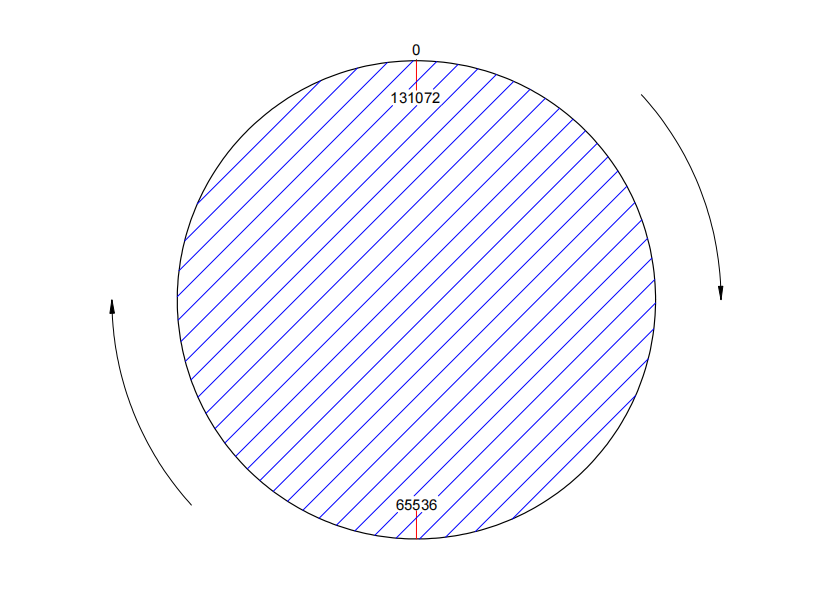
Regardless of how many turns the motor rotates, the single-turn position information remains fixed, consistently following the pattern 0 → 65536 → 131072 → 65536 → 0. This represents the encoder's single-turn absolute position information. As soon as the motor stops, its specific position within one rotation can be obtained.
- U40.1E (Encoder Multi-Turn Position Information):
This is the most critical parameter for multi-turn absolute positioning. When the motor is operating in any absolute positioning mode other than single-turn mode, the cumulative turn count is reflected here each time the motor completes a full rotation.
- U40.24 (Absolute Position Feedback (Encoder Units) Lower 32 Bits):
This parameter accumulates the encoder's absolute position but has a value range of -2,147,483,648 to 2,147,483,647. Once this limit is exceeded, the count wraps around. However, each time the cumulative count exceeds 2,147,483,647 (2^31) encoder units, the upper 32-bit parameter U40.26 increments by 1.
- U40.26 (Absolute Position Feedback (Encoder Units) Upper 32 Bits):
As described above, the upper 32 bits prevent count overflow. Combined, the multi-turn data capacity is 64 bits.
A simple position calculation example is as follows:
Current Absolute Position (encoder units) = U40.26 × 2^32 + U40.24
Note: U40.24 holds the lower 32 bits and U40.26 holds the upper 32 bits of the 64-bit absolute position value.
3. Common Issues and Solutions
- What is the battery lifespan? How can I purchase replacement batteries?
The typical battery lifespan is approximately two years under normal operating conditions. Actual lifespan may vary depending on temperature, usage patterns, and environmental factors. Regular replacement is recommended. The battery model used is ER14505. Replacement batteries can be purchased on platforms such as Amazon or eBay. The A6 servo drive provides the ALF9.0 alarm, which notifies the user when the battery voltage is too low.
- Why does the servo drive still trigger an alarm after setting C00.07 and power-cycling?
If the absolute positioning function is being enabled on the servo motor for the first time, two power-off and restart cycles are required:
- Set parameter C00.07 and save it successfully.
- Power off and restart the servo drive.
The servo drive will then display an ER20.8 alarm. To resolve this, set parameter F31.10 to the encoder reset command value (F31.10 = 4) as shown below:
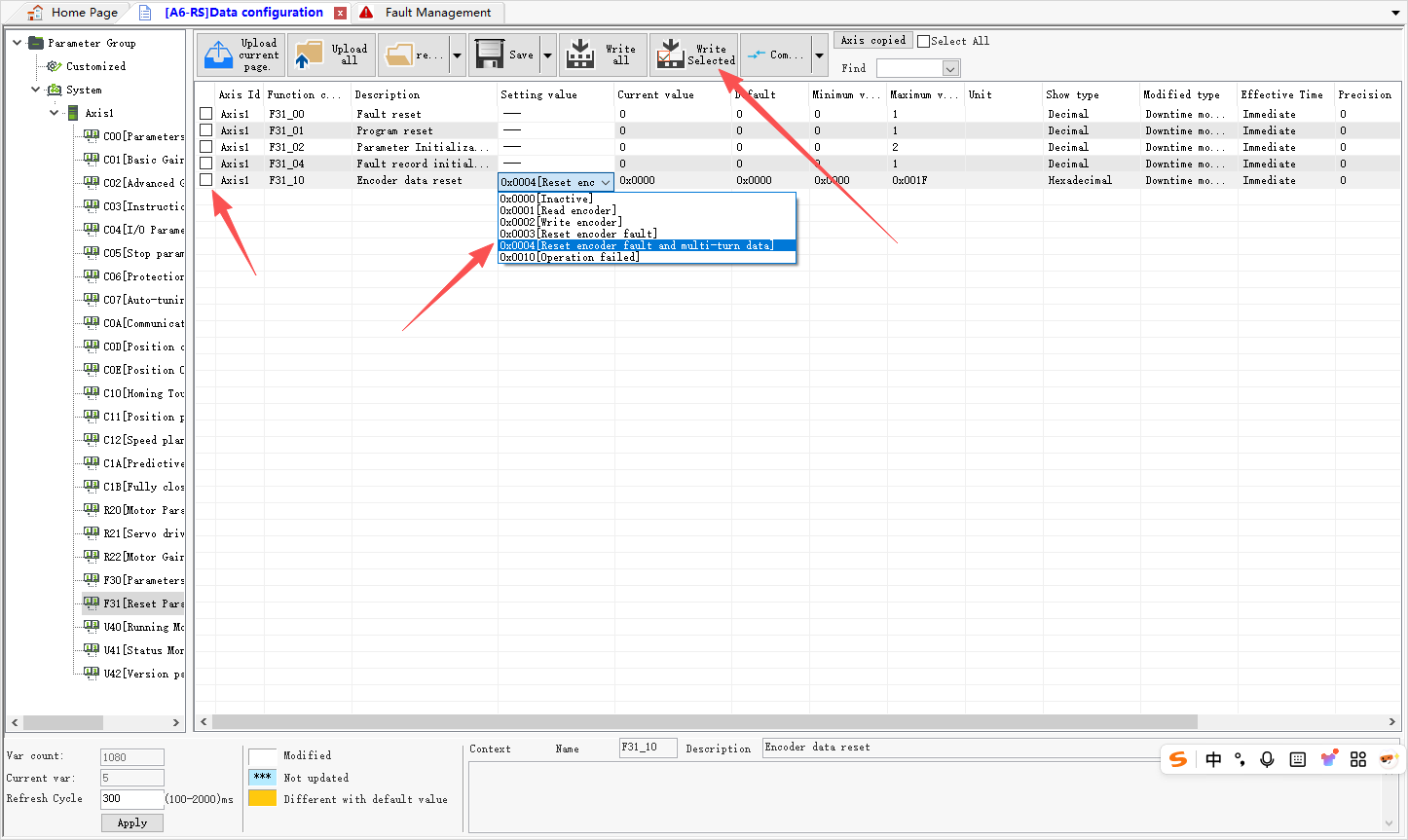
After that, power off and restart the servo drive again. You can then verify whether the absolute positioning function has been successfully enabled via the status interface:
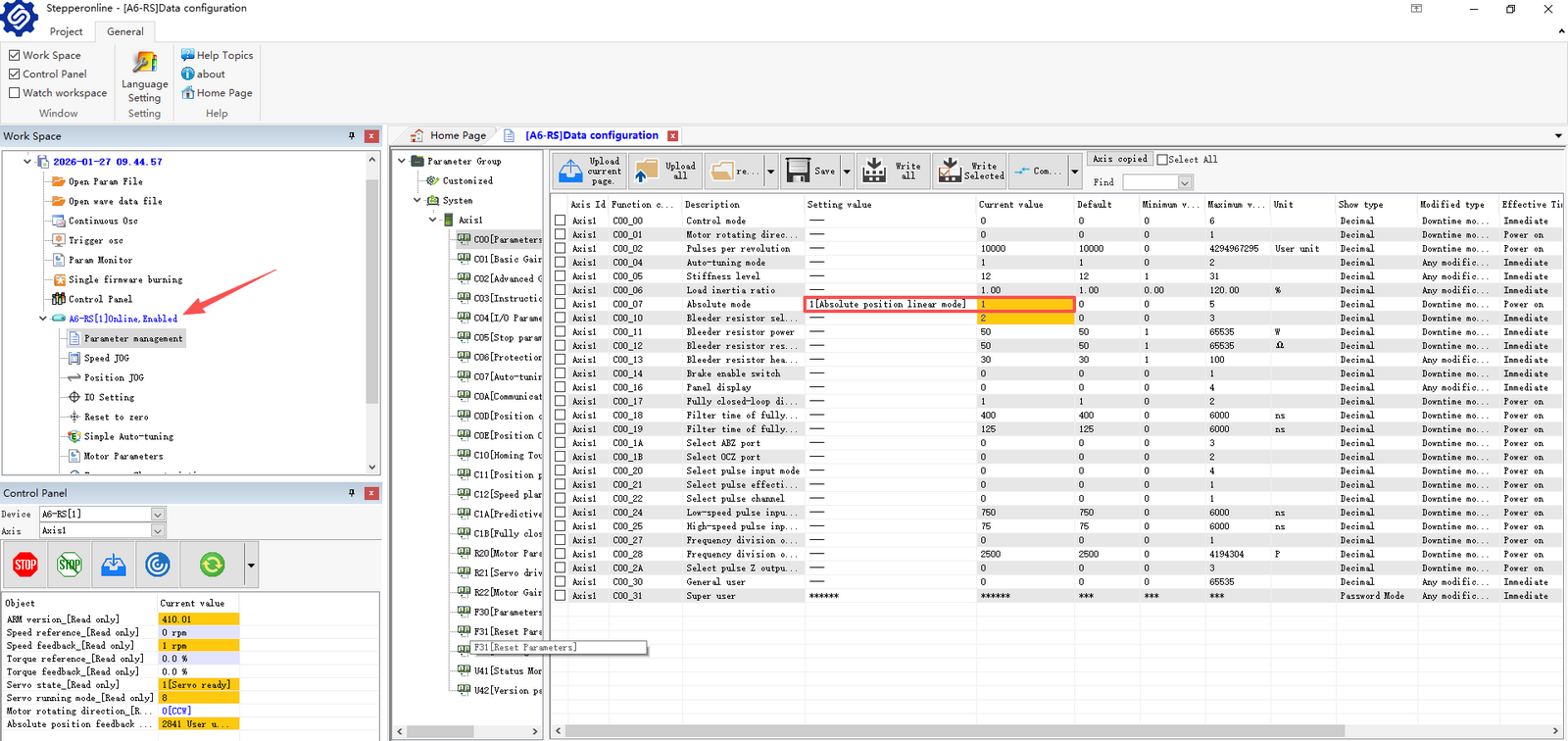
As shown in the figure, the servo drive is online and operating normally, indicating that the absolute positioning function has been successfully enabled. This two-step restart process is only required for the initial activation of the absolute function. For subsequent changes to C00.07 or when switching between absolute positioning modes, only one restart is needed.
- Why is the position data lost after power-cycling, even with the battery box cable?
First, check the battery voltage or replace it with a known-good battery. To isolate the issue, connect a spare encoder cable with a fresh battery while keeping the motor stationary, then verify whether position data is retained after a power cycle.
Second, review other parameters in the servo drive's U40 group to determine whether all data is lost or only specific parameters. If this occurs, contact our support team for assistance.
Finally, if the PLC loses data but the servo drive retains it, the issue may lie in the PLC connection. Inspect the communication interface and wiring for potential issues.
- How to clear absolute position data?
If you need to clear all position data, refer to the following steps:
- Locate the homing function.
- Select "Use Only Motor Z Signal."
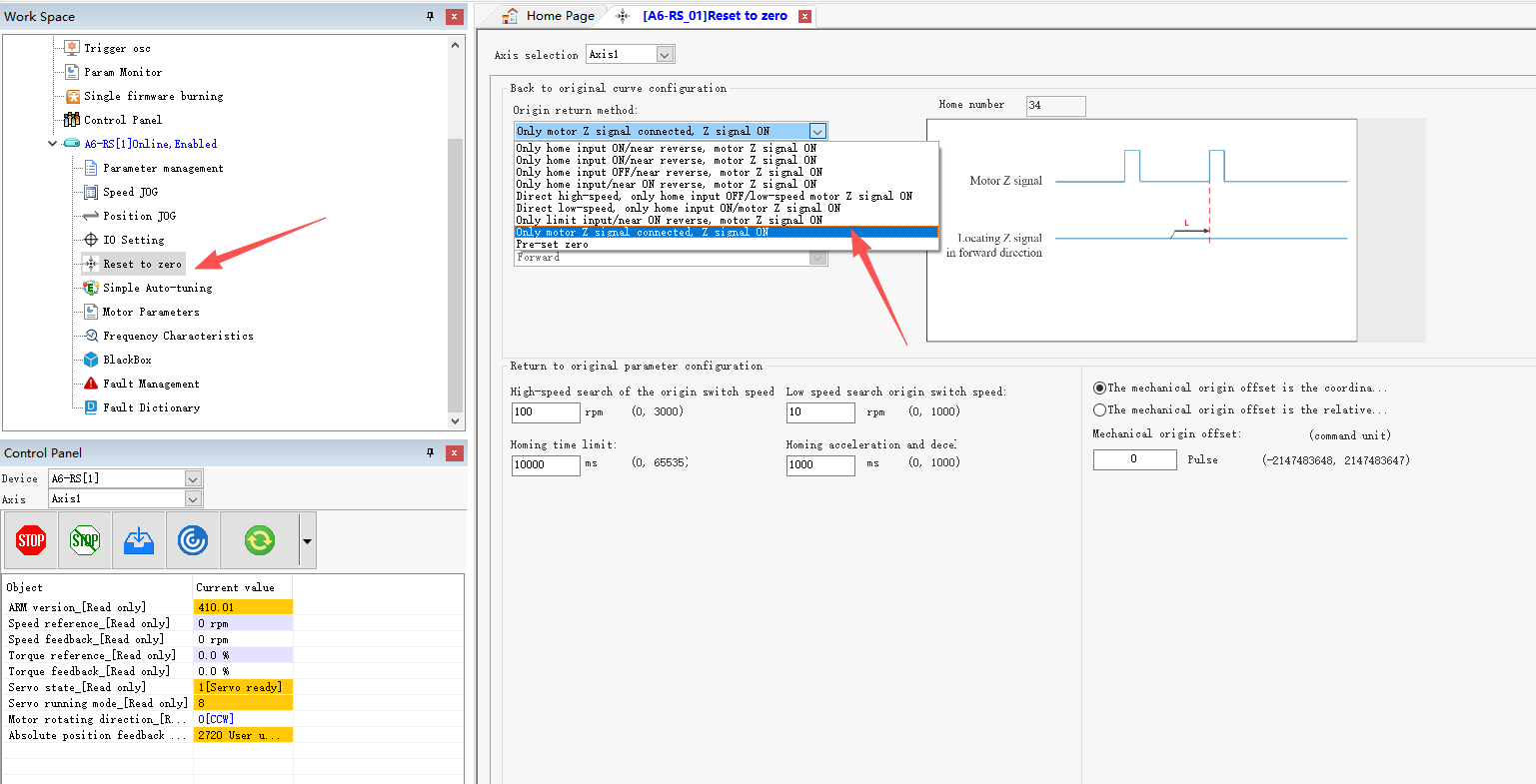
As shown in the figure below, the mode will automatically change to 34. Other settings do not need to be modified and can remain at their default values. (Mode 34 is the simplest and most convenient option.)
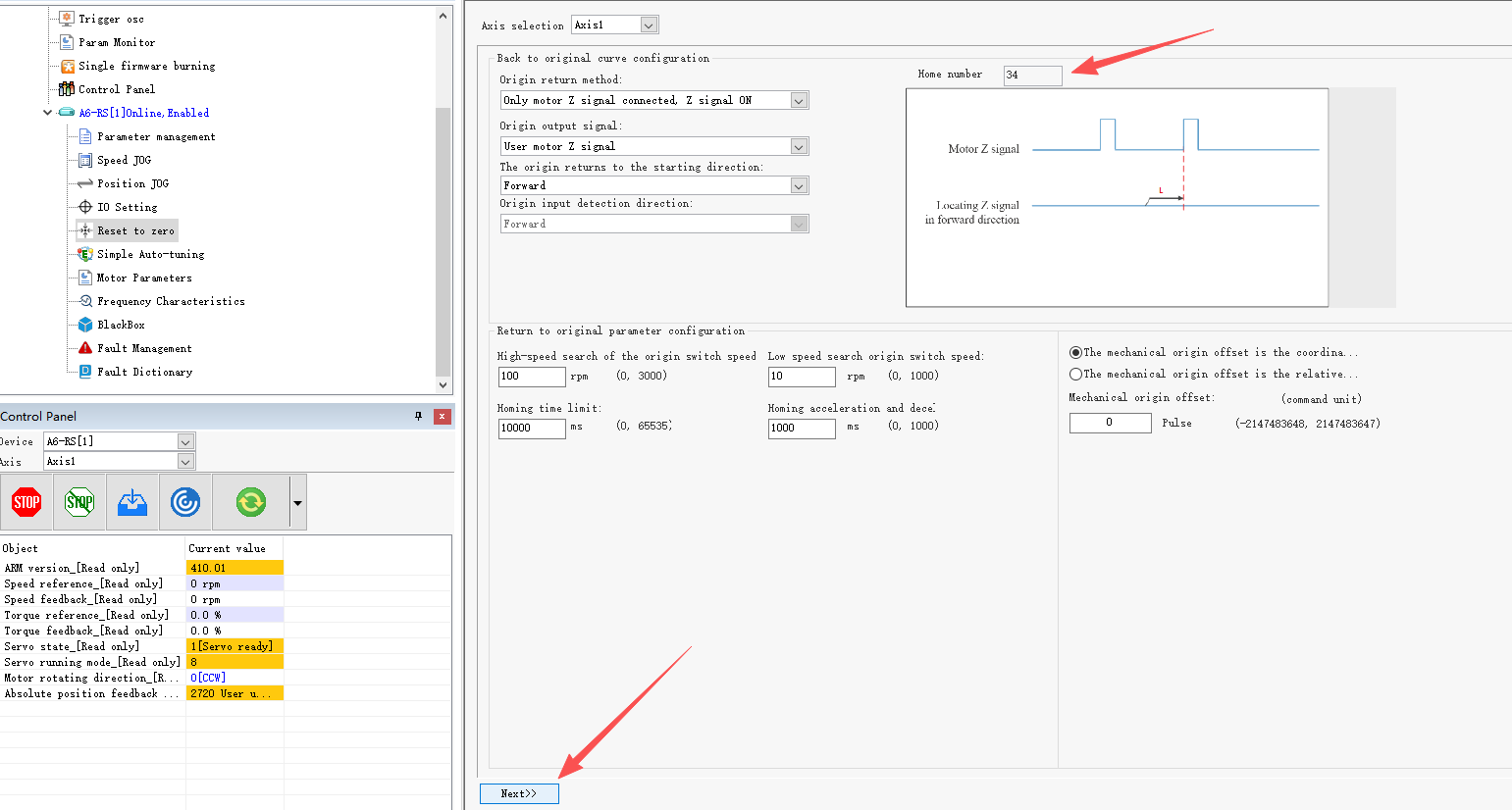
Click the Start button to begin homing.
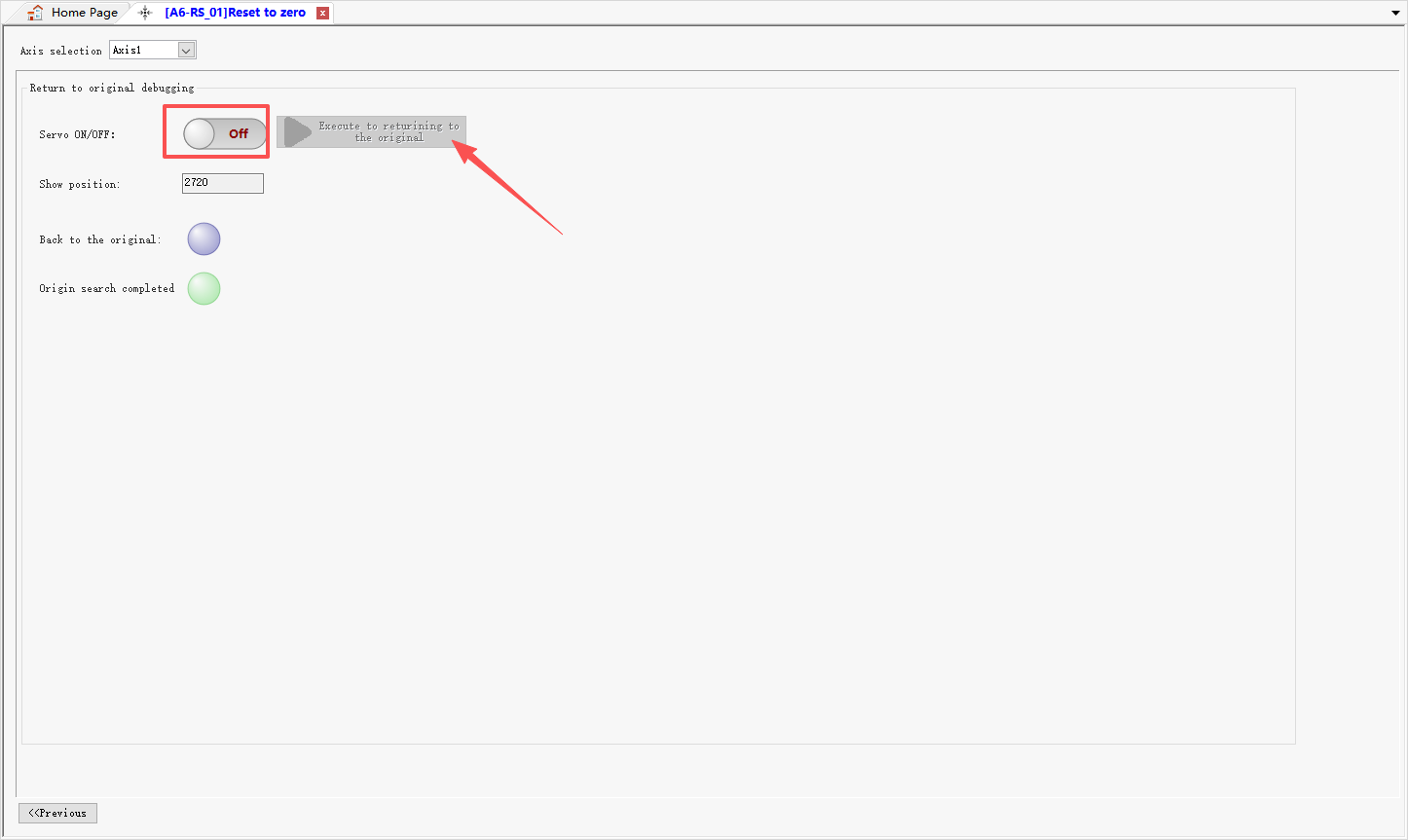
The motor will rotate slowly until it reaches the zero position, as shown in the figure below.
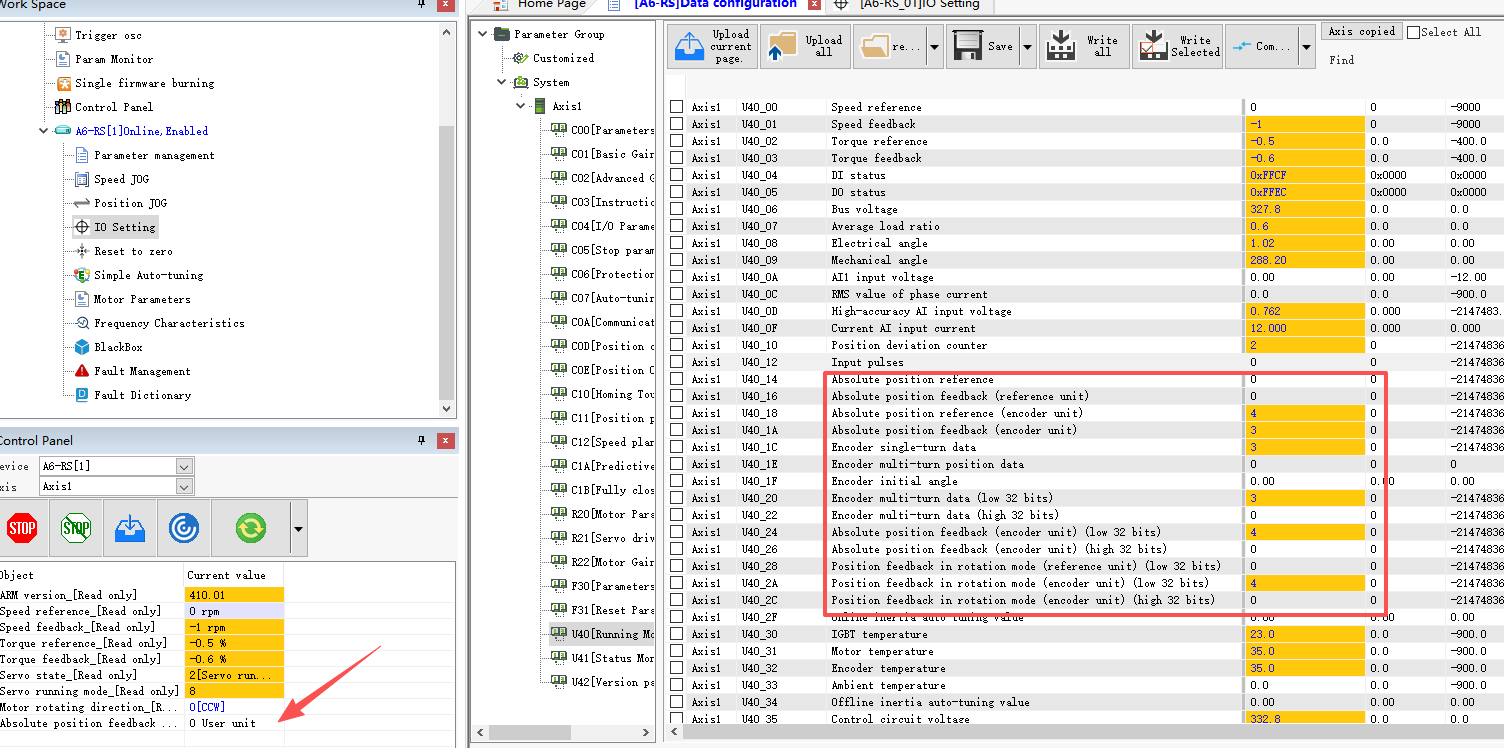
If you only need to clear the multi-turn position data while keeping other position data unchanged, refer to the method described in Section 2 above (F31.10 = 4). This will reset U40.1E to zero.