If you experience vibration while using T6 servo products, follow the procedures below to eliminate it.
Prerequisites
Before adjusting any servo parameters, verify the following conditions:
- The brake is released.
- The mechanical installation is balanced.
- The coupling is properly aligned (no misalignment or shifting).
- The gears mesh correctly.
- The encoder wiring is correct.
- There is no electrical interference.
Once all prerequisites are met, proceed to adjust the inertia ratio, stiffness, and related parameters of the T6 servo.
Procedure
Step 1: Verify Wiring
Ensure the motor wiring is correct. The motor should be automatically recognized by the driver.
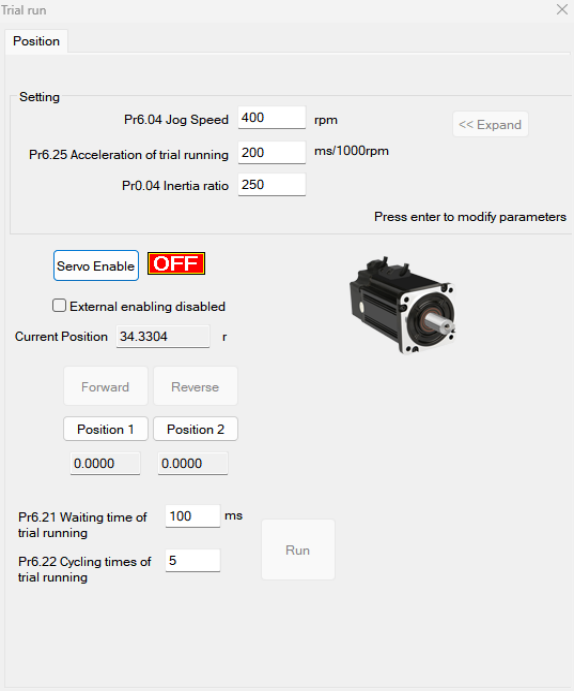
Step 2: Perform an Operating Test
Use the Operating Test function to verify that the motor operates properly.
Step 3: Configure the Servo-ON Signal (Pr400)
Set the Pr400 value based on the Servo-ON signal type:
- Normally closed (NC) external Servo-ON signal: Pr400 = 83
- Normally open (NO) external Servo-ON signal: Pr400 = 3
Step 4: Select the Control Mode (Pr0.01)
Set Pr0.01 to the desired control mode:
- 0: Position mode
- 1: Speed mode
- 2: Torque mode
Step 5: Connect the Motor to the Load and Adjust the Inertia Ratio (Pr0.04)
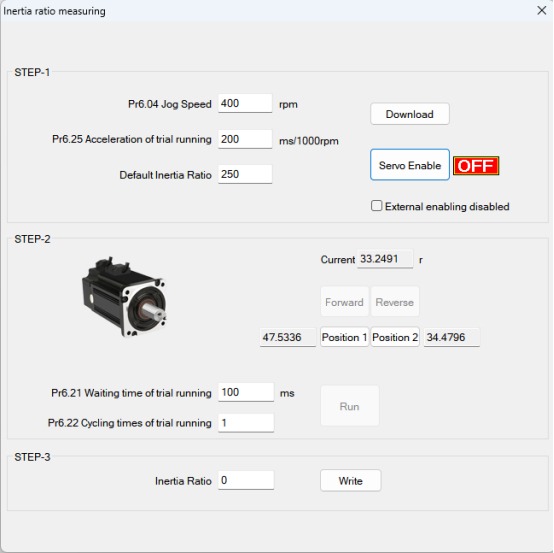
Before setting other parameters (such as PID settings for the position loop or speed loop), it is critical to determine the inertia ratio of each axis to achieve optimal performance. Connect the motor to the load and ensure the axis can move freely within a safe range, avoiding any mechanical interference to guarantee test safety and accuracy.
Inertia Ratio Auto-Tuning
Preconditions:
- The servo is disabled (Servo-ON is off).
- The positive limit and negative limit signals are disabled.
Steps:
- Set the jog speed (Pr6.04). Do not set it too high; a value between 300 and 1000 rpm is recommended. Set Pr6.25 to 50–100 ms/1000 rpm. Set the default inertia ratio. Download these settings to the driver and enable the servo.
- Click Forward to run the motor in the forward direction, then click Position 1 to save position limit 1. Click Reverse to run the motor in the reverse direction, then click Position 2 to save position limit 2. Click Run to start the inertia ratio auto-tuning process.
- After completion, click Write to save the identified inertia ratio to EEPROM.
Step 6: Connect the Motor to the Load and Adjust the Stiffness (Pr0.02, Pr0.03)
- Ensure the motor is in a stopped state (Servo-ON is off). The inertia ratio must be set correctly before proceeding; an incorrect inertia ratio will degrade tuning results.
- Set Pr0.02 (real-time auto-tuning) to
0x01/0x11or0x02/0x12. Then set Pr0.03 (machine stiffness setting). - Turn on the Servo-ON signal. The machine will operate under normal conditions and begin estimating load characteristics. The associated control parameters will be adjusted automatically.
- Increase the Pr0.03 value to improve motor responsiveness. Observe the positioning time and check for any noticeable vibration. Set the stiffness value as high as possible without causing vibration.
- Save the results and write them to EEPROM.
Step 7: Fine-Tune Motion Smoothness (Pr2.22, Pr2.23)
If necessary, adjust Pr2.22 and Pr2.23 to achieve smoother motion.
Step 8: Configure Filter and Gain Parameters (Pr0.06–Pr0.10)
Set the values of Pr0.06, Pr0.07, Pr0.08, Pr0.09, and Pr0.10 as needed to optimize system response and reduce vibration. These parameters control various filtering and gain settings within the servo control loops. Refer to the T6 servo parameter manual for detailed descriptions and recommended values for your specific application.
Step 9: Adjust Pr0.00 for Greater Stiffness
Before proceeding, ensure the following settings are correctly configured:
- Control mode: Pr0.01 = 0 (Position mode)
- Real-time auto-tuning: Pr0.02 = 1 (for interpolation motion)
- Inertia ratio: Pr0.04 (set as determined in Step 5)
- Stiffness: Pr0.03 (set as determined in Step 6)
Then configure Pr0.00 according to your motion requirements:
- Single-axis or non-synchronized operation: Set Pr0.00 to 1 or a value greater than 10.
- Multi-axis synchronized motion: Set the same Pr0.00 value on all axes.
- When Pr0.00 > 10: Start from 100 and increment in steps of 50 (e.g., 100, 150, 200, 250, ...).
Caution: Do not change the value of Pr0.00 while the motor is running. Doing so will cause vibration and may damage the system.
Additional Notes:
- Always establish the correct control mode and set the correct inertia ratio and stiffness before adjusting Pr0.00.
- When operating in manual mode, start with a smaller Pr0.00 value. A smaller value results in smoother motion, while a larger value provides faster positioning.