- Brushless Motor Fails to Operate
1.1 Wiring Issues
Refer to the brushless motor's datasheet and the brushless driver's labeling to verify correct wiring. The corresponding connections are as follows:
| Motor | U | V | W | +5V | GND | A | B | C |
|---|---|---|---|---|---|---|---|---|
| Driver | MA | MB | MC | +5V | GND | HA | HB | HC |
1.2 Brushless Driver Not Enabled
The EN (Enable) port logic varies across StepperOnline brushless drivers—some require EN to be pulled high (connected to a voltage source), while others require EN to be pulled low (connected to GND) to enable the motor. Refer to the driver's manual to confirm the correct enable logic for your specific model. Alternatively, try toggling the EN-GND connection to test if the motor starts.
1.3 Incorrect R-SL or R-CS Settings
The R-SL parameter on the brushless driver sets the speed limit, while the R-CS parameter adjusts the current limit. If either is set to 0, the motor will not run. Verify that these settings are correct.
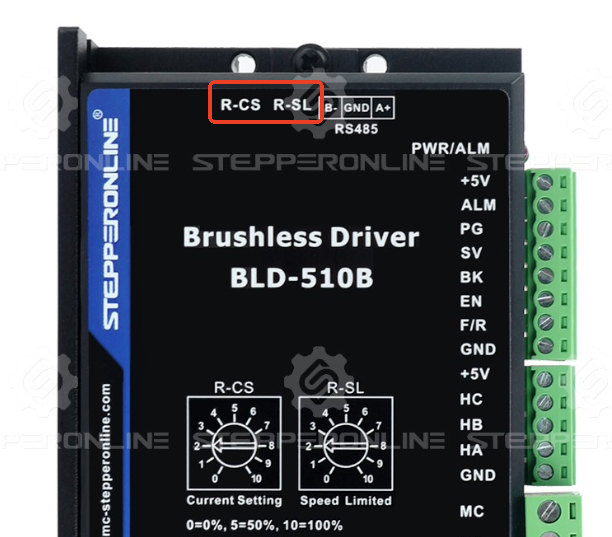
1.4 Incorrect Internal/External Control Mode Setting
StepperOnline brushless drivers support two control modes:
-
Internal Control Mode: The motor is controlled via commands sent over RS485 communication.
-
External Control Mode: The motor is controlled via the driver's digital I/O ports (e.g., pulse/direction or analog input).
If the wrong mode is selected, the driver will not operate the motor. Some drivers automatically switch to Internal Control after modifying parameters via RS485. Check the driver's manual to confirm the correct control mode setting.
1.5 Driver Triggered an Alarm
If the driver detects a fault, it will illuminate a red LED and stop the motor. If the LED is on:
Use RS485 to read the driver's fault code registers (refer to the manual).
Some drivers display error codes via LED blinking patterns—check the manual for decoding.
1.6 Incorrect Driver Parameter Settings
If parameters are misconfigured, the motor may not run. Verify all driver settings.
Note: Except for the BLD-510S and BLD-510B models, other StepperOnline brushless drivers are not fully compatible with the StepperOnline BLDC Software V2.7. Using this software may write parameters to incorrect registers. For these drivers, we currently recommend using alternative RS485 serial software to modify motor parameters.
1.7 Brushless Motor or Driver Damaged
If the brushless motor still fails to operate after all the above checks, the motor or driver may be damaged. If you have spare brushless motors or drivers, try swapping them to isolate the faulty component.
- Brushless Motor Speed Does Not Match Expectations
2.1 Incorrect R-SL Setting on the Brushless Driver
The R-SL parameter on the brushless driver limits the motor's maximum speed. If set too low, the motor may not reach higher RPM. Verify that the R-SL parameter is adjusted correctly.
2.2 Incorrect "Pole Pairs" Parameter Setting
The brushless driver's "pole pairs" parameter is critical for speed control. Refer to the motor's datasheet to confirm this setting. Note: The driver requires pole pairs (not total poles). Typically, pole pairs = total poles / 2.
2.3 Calculation Error When Converting Register Parameters to Actual Speed
If reading motor speed from register parameters, ensure correct calculation:
a. Register values are in hexadecimal and must be converted to decimal. Note: Data format is little-endian (LSB first). For example, a register value of C8 00 should be interpreted as 00 C8 (hex) = 200 (decimal).
b. The register value represents the electrical frequency. To convert to mechanical RPM, use the formula provided in your driver's manual. For applicable models: Actual RPM = (Register decimal value × 20) / Total motor poles. Example:
-
Motor total poles = 4 (pole pairs = 2)
-
Register speed value = C8 00 → 00C8 (hex) = 200 (decimal)
-
Actual speed = (200 × 20) / 4 = 1000 RPM
Note: Verify this formula applies to your specific driver model by consulting the manual. Due to Hall sensor precision limitations, the actual speed may have a ±5% error.
If the brushless motor issue persists after performing the above checks, please contact StepperOnline technical support and provide the test results or videos. We will assist you in resolving the issue as soon as possible.