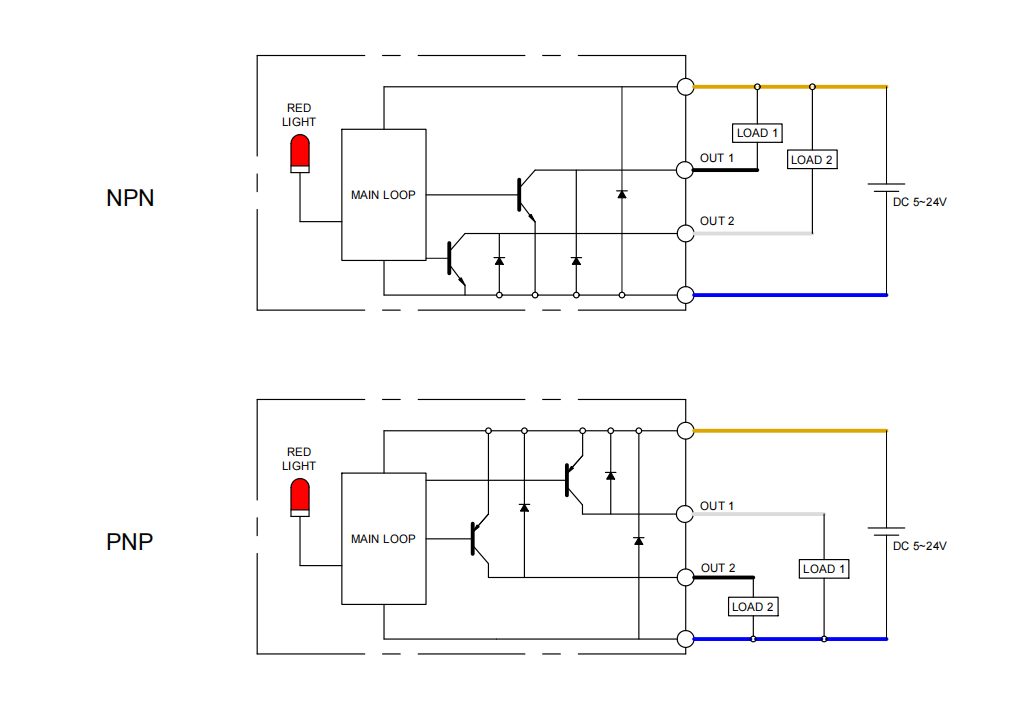
The working principle of a photoelectric sensor is based on the photoelectric effect, which converts changes in optical signals into changes in electrical signals to achieve measurement and control functions. These sensors generally consist of three main parts: a light source, an optical path, and photosensitive elements. Typically, photoelectric sensors are used to detect the home position or travel limits of a linear actuator.
Our linear actuator products include at least one sensor. If you need to install additional sensors, please contact our sales team for customization.
Photoelectric Sensor Wiring Instructions:
- Connect the power wires: Connect the positive wire (typically red) to the VCC pin of the photoelectric sensor, and connect the negative/ground wire (typically black) to the GND pin.
- Connect the signal output wire: Connect the output wire (typically white, but refer to the sensor datasheet for your specific model) to the input of the device or circuit you want to control, such as a PLC (Programmable Logic Controller), microcontroller, or relay. If driving relays or other high-power loads, ensure the output wire can handle the required current.
- Configure the external circuit: Depending on the type of photoelectric sensor and your application requirements, you may need to configure the external circuit for NPN (sink) or PNP (source) input mode, depending on your controller's requirements. Refer to the wiring diagram below and your controller's documentation for guidance.
- Verify all connections: Ensure all connections are secure, with no short circuits or loose wires.