First, it is important to understand that the whining sound from a servo motor is essentially a form of high-frequency vibration. This vibration is perceived as an audible high-pitched noise. The root causes mainly stem from the following aspects:
- Mechanical Resonance (This is the most common cause):
- Insufficient rigidity in the connection between the motor and the load (such as ball screws, belts, or gears).
Solution: Ensure that the connecting components (couplings, timing belts, gears, etc.) between the motor and the load are securely fastened, reliable, and free from looseness or backlash. For connections with backlash, replacement or adjustment is necessary.
- Weak rigidity of the mounting baseplate or insecure fixing.
Solution: Verify that the mounting baseplate for the motor and load has sufficient rigidity and that the fixing bolts are tightened to the specified torque. If necessary, increase rigidity by adding reinforcing ribs or using a thicker mounting plate.
- Low natural frequency inherent in the load's design.
Solution: If the structure allows, try adding damping materials (such as rubber pads) or mass blocks to the motor or load. This helps alter the natural frequency of the entire mechanical system, shifting it away from the frequency range that excites audible resonance.
- Improper Adjustment of Servo Gain Parameters:
- Excessive Stiffness (Gain too high): To improve response speed, the speed loop gain or position loop gain may be set too high. This causes the motor to over-correct, continuously making fine adjustments, which results in high-frequency oscillation and whining. This is the most common scenario encountered during commissioning.
- Insufficient Stiffness (Gain too low): Although not a common cause of high-frequency whining, this can lead to issues like sluggish system response and positioning overshoot.
- Servo Gain Tuning Procedure:
3.1. Check parameter C00.05 (Control Mode Selection) to confirm the drive is operating in the correct control mode.
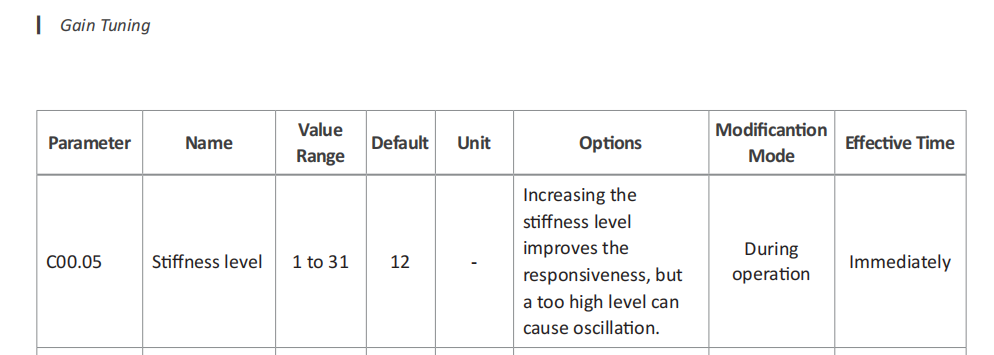
3.2. Try reducing the speed loop gain (C01.01). This parameter has the most significant impact on noise. Decrease it in small increments (e.g., by 10%–20% each time) and observe if the whining improves. If the response becomes sluggish or following errors appear after reduction, you can appropriately fine-tune the speed loop integral time constant (C01.02) and position loop gain (C01.00) to compensate.
3.3. Use the Notch Filter.
A6 servo drives typically have a built-in adaptive notch filter function. This feature can automatically detect and suppress specific resonance frequencies. It is highly recommended to enable this function. It will automatically identify the system's resonance points and significantly attenuate signals at those frequencies, effectively eliminating the whining sound. Regarding the notch filter settings, please proceed with the software operation as follows:
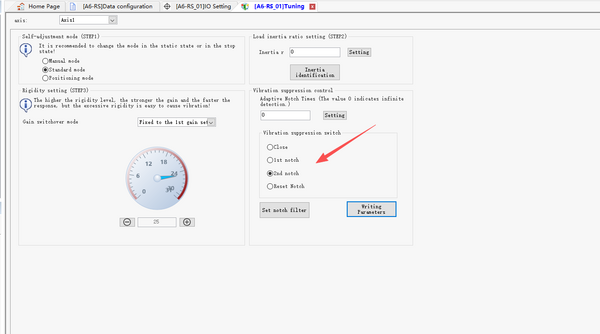
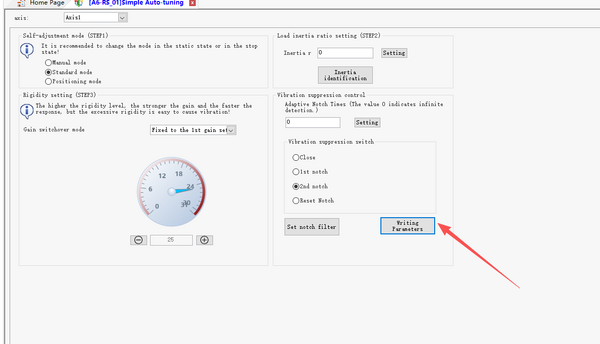
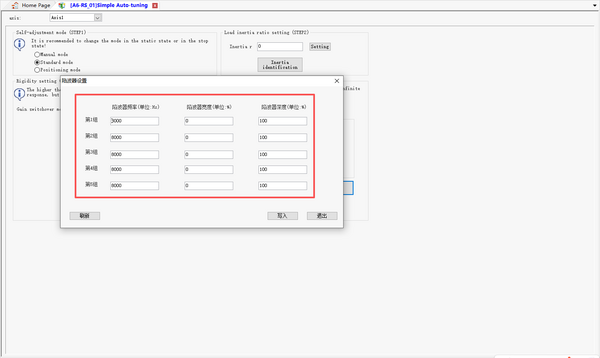
In summary, when encountering whining from an A6 servo, first check the mechanical installation. Then, access the A6 drive's software, enable the notch filter, and appropriately reduce the speed loop gain. If the noise persists after the above steps, consider increasing the PWM carrier frequency (if supported by your drive model). Note that a higher carrier frequency increases drive heat dissipation — ensure adequate cooling. Refer to the A6 parameter manual for the carrier frequency setting.