Stepper motor drivers use optocouplers (opto-isolators) on their signal input terminals (PUL, DIR, EN) to electrically isolate the controller from the driver. These optocouplers can be wired in either a common cathode or common anode configuration. The correct choice depends on your controller's output type (NPN or PNP).
Wiring Differences
Common Cathode Connection
In a common cathode configuration, the cathodes (negative terminals) of the driver's input optocouplers are tied together and connected to the controller's ground (0V). Each signal input (PUL, DIR, EN) is driven individually by the controller's output pins. A high-level signal from the controller activates the input.
Common Anode Connection
In a common anode configuration, the anodes (positive terminals) of the driver's input optocouplers are tied together and connected to a common positive supply (e.g., +5V or +24V) via the driver's OPTO terminal. Each signal input (PUL, DIR, EN) is activated by pulling the corresponding controller output to a low level.
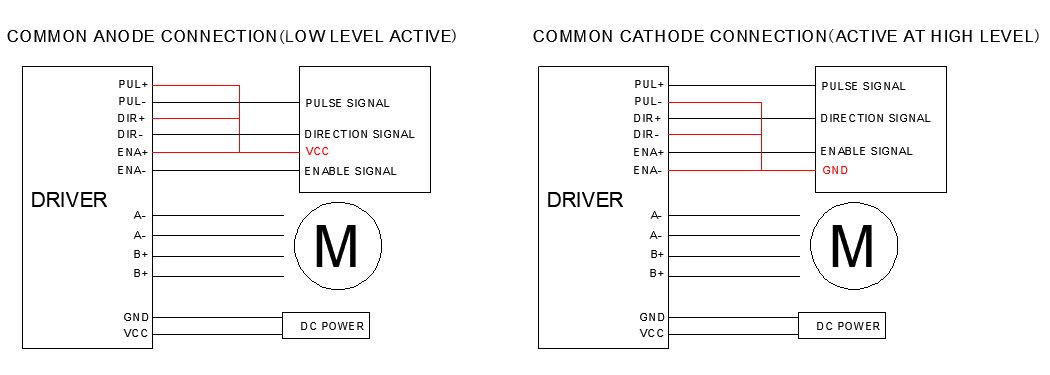
Signal Logic (Active-High vs. Active-Low)
| Configuration | Signal Logic | Activation |
|---|---|---|
| Common Cathode | Active-high | A high-level signal activates the input; a low-level signal deactivates it. |
| Common Anode | Active-low | A low-level signal activates the input; a high-level signal deactivates it. |
Controller Compatibility
The wiring configuration you use must match your controller's output type:
-
Common Cathode (for PNP/sourcing controllers): PNP-type controllers source current from their output pins. They work with common cathode wiring, where the driver's optocoupler cathodes are connected to ground and the controller provides a high-level signal to activate the input.
-
Common Anode (for NPN/sinking controllers): NPN-type controllers sink current to ground. They work with common anode wiring, where the driver's optocoupler anodes are connected to a positive supply and the controller pulls the signal line low to activate the input.
StepperOnline Drivers with an OPTO Terminal
For StepperOnline drivers that feature an OPTO terminal: the OPTO terminal is internally connected to the anodes of all input optocouplers. These drivers are designed for common anode connection. To use them:
- Connect the OPTO terminal to your positive supply voltage (e.g., +5V or +24V, depending on your controller's output voltage).
- Connect the signal pins (PUL, DIR, EN) to your controller's output pins.
- The controller outputs pull the signal lines low to activate each input.
Note: If your controller has PNP (sourcing) outputs and your driver only supports common anode wiring (OPTO terminal), you may need an intermediate relay or level-shifting circuit to convert the signals.
Summary
Both common anode and common cathode wiring are equally valid and widely used in industrial automation. The key is to match the driver's input configuration with your controller's output type:
- NPN (sinking) controller outputs → Common anode driver wiring
- PNP (sourcing) controller outputs → Common cathode driver wiring
Always consult your controller's and driver's documentation to confirm the correct wiring for your specific setup.