DIP switches let you configure the stepper motor and driver system to match your specific application requirements, achieving optimal performance, accuracy, and reliability.
A stepper motor is a passive actuator — its performance (torque, speed, smoothness, and noise) depends entirely on how the driver controls it. DIP switches are how you configure the driver's operating parameters.
Below are the core reasons and specific objectives for setting the DIP switches.
Setting Microstepping Resolution
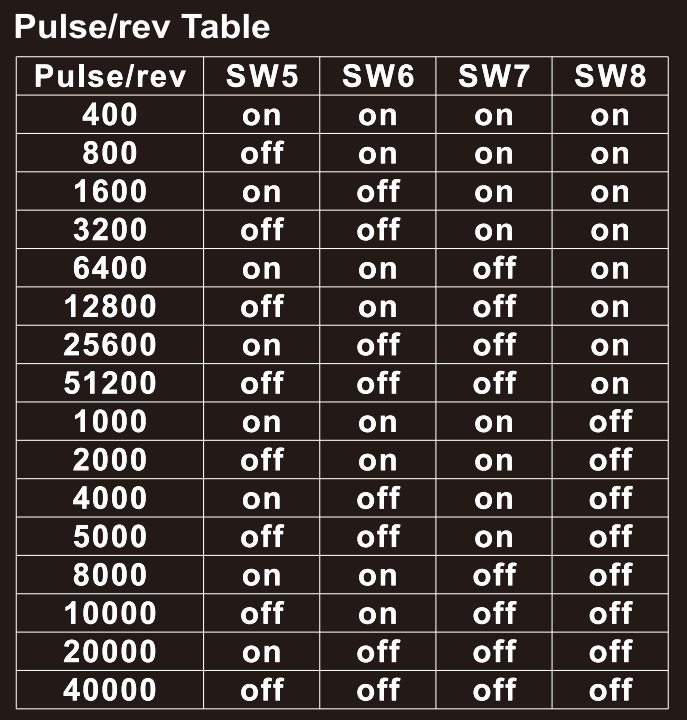
- Problem: The basic step angle of a stepper motor (e.g., 1.8°) is fixed, resulting in 200 steps per revolution. At low speeds or in full-step mode, motion can be uneven (cogging, vibration, noise), and the resolution may be insufficient for some applications.
- Solution: By configuring the microstepping resolution, the driver divides one full step into multiple smaller microsteps. For example, 16× microstepping divides each step into 16 parts, so the motor requires 3,200 pulses per revolution (200 × 16).
- Reasons for Setting:
- Improve Running Smoothness: Microstepping produces smoother current transitions, significantly reducing low-speed vibration and noise.
- Increase Positioning Resolution: Achieves finer position control without modifying the mechanical system.
- Reduce Resonance Effects: Motors are prone to resonance at specific mid-range speeds, which can cause lost steps. Microstepping smooths the current transitions between steps, which helps reduce the impact of resonance.
Setting the Output Current
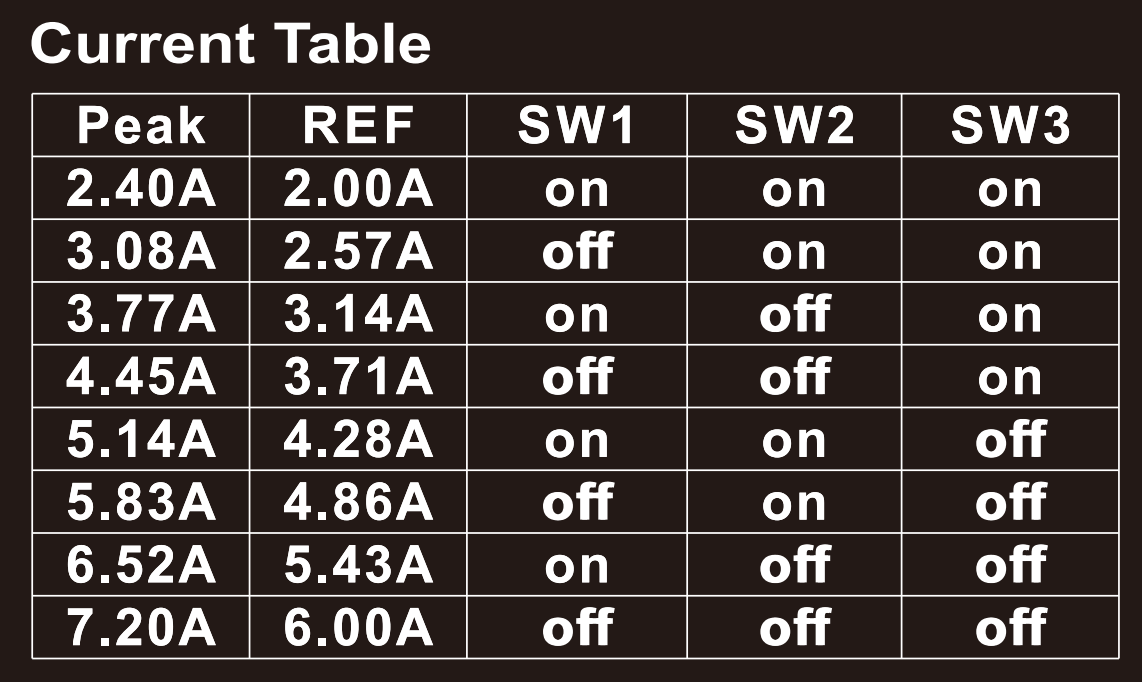
- Problem: Each stepper motor has a rated current. If the driver's output current is lower than the motor's rated current, the motor will not produce sufficient torque. If it is significantly higher, the motor can overheat and potentially be damaged.
- Solution: The DIP switches allow you to set the driver's output current to match the motor's rated current (typically set equal to or slightly below the rated value).
- Reasons for Setting:
- Match the Motor: Ensure the motor can deliver its rated torque.
- Prevent Overheating: Avoid excessive heat generation in both the motor and driver due to overcurrent, extending equipment lifespan.
- Energy Saving: Setting an appropriate current reduces energy consumption and heat generation while still meeting torque requirements.
Setting the Control Signal Mode

- Problem: Different controllers may output different signal types.
- Solution: The DIP switches allow you to select the signal mode. Common signal modes include:
- Pulse/Direction Mode: One pin sends pulses (each pulse represents one step), and another pin controls the direction (high level for one direction, low level for the other). This is the most common mode.
- CW/CCW Mode: One pin sends pulses for clockwise rotation, and another pin sends pulses for counterclockwise rotation.
- Reasons for Setting:
- Controller Compatibility: Ensure the driver correctly interprets the controller's commands; otherwise, the motor may run erratically or not at all.
Setting the Holding Current (Half-Current / Full-Current)

- Problem: When the motor is stationary, continuing to supply the full rated current causes the coils to generate heat continuously. This wastes energy in applications where full holding torque is not required.
- Solution: The DIP switches can be set to automatically reduce the current to 50% of the rated value or less (half-current holding) after the motor has been stationary for a set period.
- Reasons for Setting:
- Energy Saving: Reduce unnecessary energy consumption.
- Reduce Temperature Rise: Significantly lower the temperature of the motor and driver during idle periods, improving system reliability.