We have received feedback from customers who have questions about using Modbus RTU over RS-485 to control A6 series servo motors. To help users better understand and use the RS-485 communication features of the A6 series, this guide provides detailed wiring instructions and practical command examples.
Important: Saving Parameters Written via RS-485 To save parameters written via RS-485 to non-volatile memory, you must send the following save command. Otherwise, all modified parameters will revert to factory defaults when the drive loses power.
01 06 0A 05 00 01 CRC CRC
1. Initial Connection and Communication Setup
Required Preparations
- An A6-RS series servo drive with motor and power cables connected
- An RJ45 Ethernet cable
- An RS-485-to-USB adapter cable (If you are unsure which one to choose, we recommend our product: USB to RS-422/RS-485 Serial Port Converter Adapter Cable)
- Serial communication software or a controller capable of sending Modbus RTU commands
Wiring
Refer to the RS-485 interface pin definitions in the A6-RS series manual:
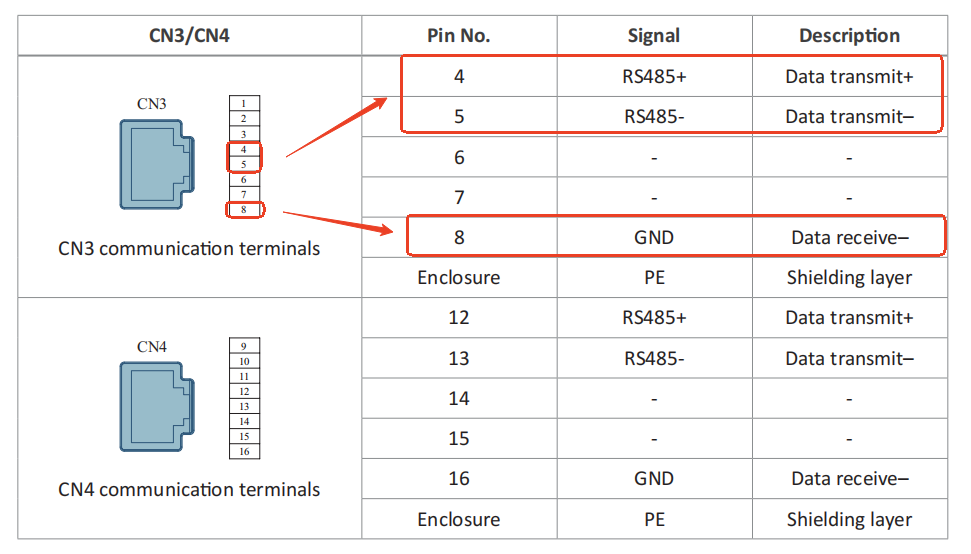
Compare with the pinout of the RJ45 Ethernet cable:
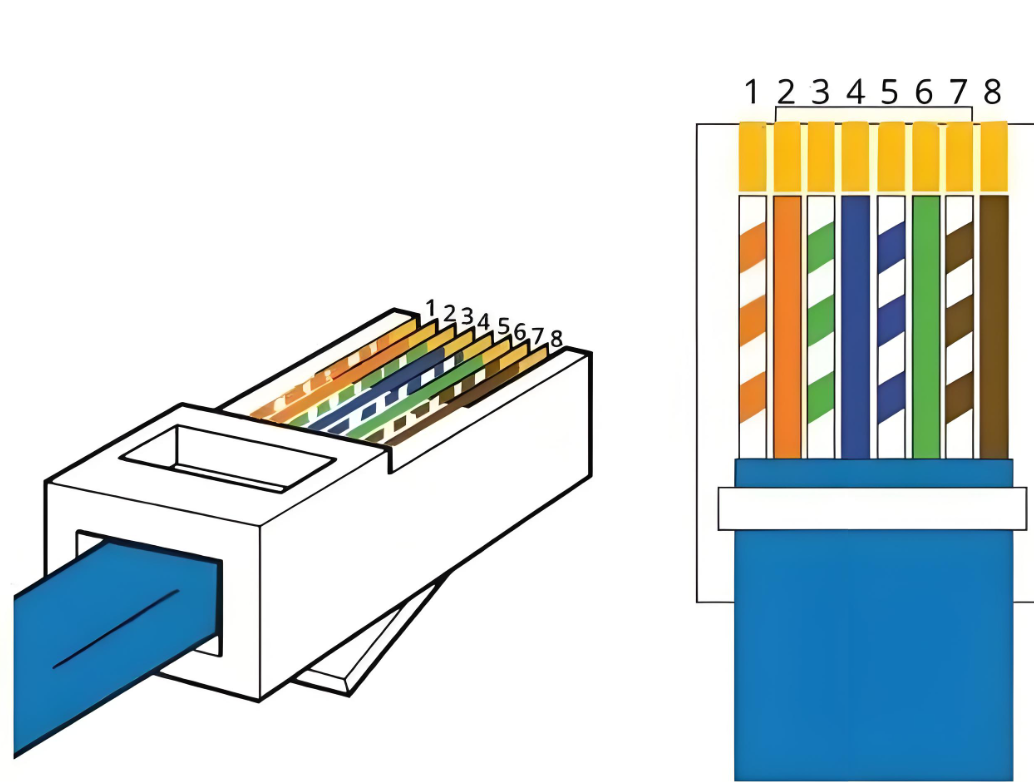
As shown in the diagrams, connect wires 4, 5, and 8 to the RS-485-to-USB adapter cable.
For the RJ45 Ethernet cable:
- Leave the RJ45 connector on one end intact for plugging into the drive's CN3 port.
- Cut off the RJ45 connector on the other end.
- Strip wires 4, 5, and 8 (blue, blue-white, and brown wires) and connect them as follows:
| Drive (CN3) | RS-485-to-USB Adapter |
|---|---|
| 485+ | TXD+ |
| 485- | TXD- |
| GND | GND |
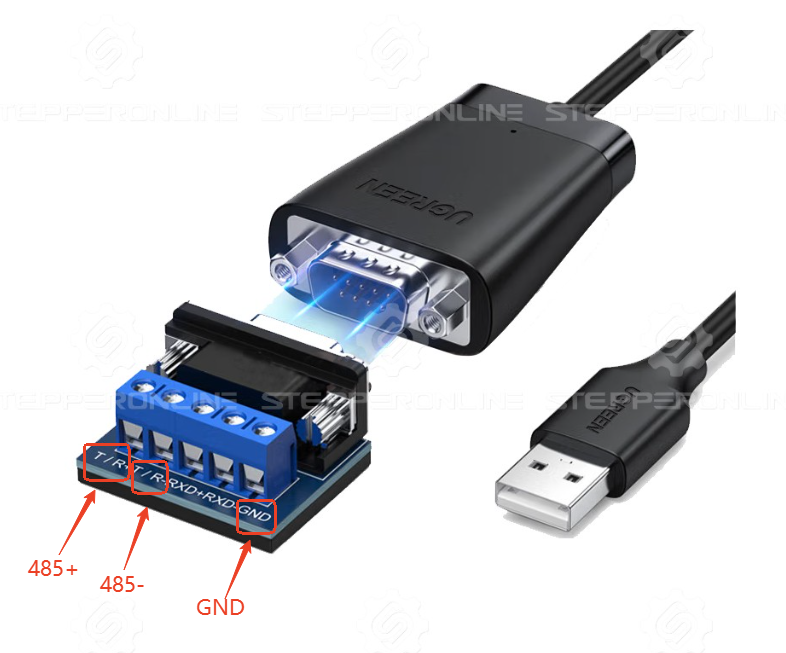
After wiring, plug the RJ45 connector into the drive's CN3 port and connect the USB adapter to your PC. Power on the drive and open the serial communication software to establish communication. If communication fails, refer to this troubleshooting article.
2. Operation Modes
2.1 Speed Control Mode
| Command | Description |
|---|---|
01 06 00 00 00 01 CRC CRC |
Set drive control mode to speed mode (C00.00=1) |
01 06 03 20 00 03 CRC CRC |
Use internal speed command (C03.20=3) |
01 06 12 00 00 01 CRC CRC |
Set speed profile mode to cyclic operation (C12.00=1) |
01 06 12 06 02 58 CRC CRC |
Set running speed to 600 RPM (C12.06=600) |
01 10 12 0A 00 02 04 00 64 00 00 CRC CRC |
Set acceleration time to 100 ms (C12.0A=100) |
01 10 12 0C 00 02 04 00 64 00 00 CRC CRC |
Set deceleration time to 100 ms (C12.0C=100) |
01 06 04 11 00 01 CRC CRC |
Enable motor and start operation (C04.11=1) |
01 06 04 11 00 00 CRC CRC |
Emergency stop: disable motor (C04.11=0) |
As shown in the examples above, parameter register addresses in the A6 series do not require complex conversions. For instance, to set C00.00 to 1, the register address in the RS-485 command is simply 0000. Similarly, setting C03.20 to 3 uses register address 0320.
The only conversion required is for the write value. All parameter values in the manual are listed in decimal format, but RS-485 commands require hexadecimal values.
Important: Data Types and Register Sizes
In Chapter 8 of the manual, the parameter table includes a "Data Type" column. Note that data types vary across parameters:
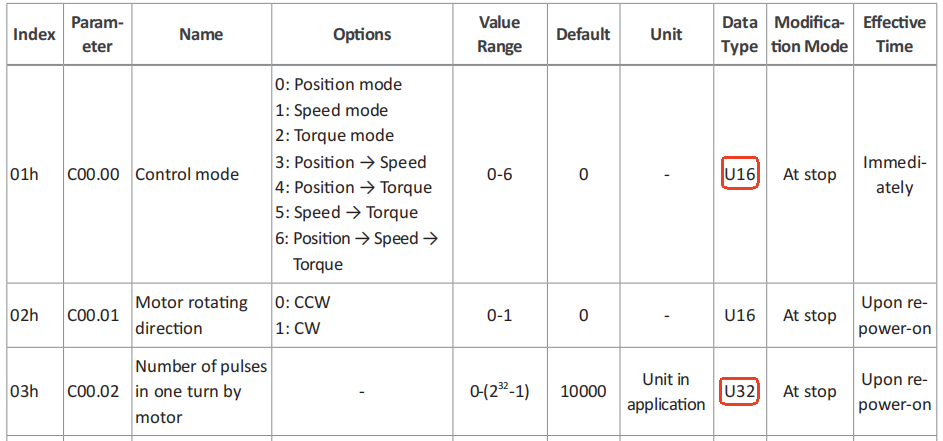
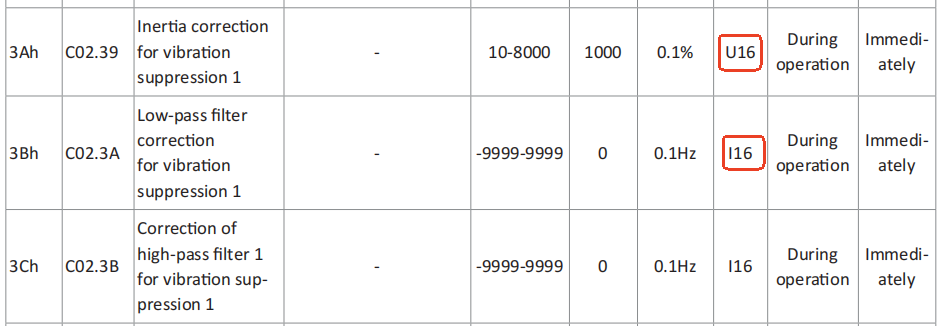
Pay close attention to the data type:
U16 — 16-bit unsigned parameter (use write command 0x06):
Example: 01 06 00 00 00 01 CRC CRC (sets C00.00 to 1)
| Field | Value | Description |
|---|---|---|
| Slave address | 01 |
Axis address (default = 1 for single-drive testing) |
| Function code | 06 |
Write single register (C00.00 is a 16-bit parameter) |
| Register address | 00 00 |
Parameter address |
| Register value | 00 01 |
Value to write (hexadecimal equivalent of decimal 1) |
| CRC | [CRC][CRC] |
Cyclic Redundancy Check (automatically calculated by most serial communication software) |
U32 — 32-bit unsigned parameter (use write command 0x10):
Example: 01 10 12 0A 00 02 04 00 64 00 00 CRC CRC (sets C12.0A to 100)
| Field | Value | Description |
|---|---|---|
| Slave address | 01 |
Axis address |
| Function code | 10 |
Write multiple registers (C12.0A is a 32-bit parameter) |
| Register address | 12 0A |
Parameter address |
| Register count | 00 02 |
Number of registers to write (2 × 16-bit registers) |
| Byte count | 04 |
Number of data bytes |
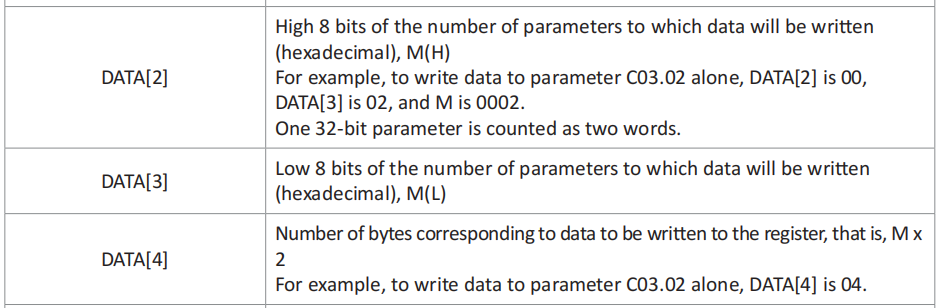
| Field | Value | Description |
|---|---|---|
| Register data | 00 64 00 00 |
Write value: 100 in hexadecimal (0x00000064). For 32-bit parameters, the data is split across two 16-bit registers. The byte order depends on parameter C0A.06. When C0A.06=0, the high-order 16 bits (0064) are written to the first register, followed by the low-order 16 bits (0000). |
| CRC | CRC CRC |
Cyclic Redundancy Check |
I16 vs. U16: The difference between I16 and U16 is that I16 represents signed 16-bit values (supporting negative numbers), while U16 represents unsigned 16-bit values. If a parameter can accept negative values, its data type is I16. Typically, speed-related parameters may have negative values, where negative and positive values indicate opposite motor rotation directions.
2.2 Multi-Speed Operation
| Command | Description |
|---|---|
01 06 00 00 00 01 CRC CRC |
Set drive control mode to speed mode (C00.00=1) |
01 06 03 20 00 03 CRC CRC |
Use internal speed command (C03.20=3) |
01 06 12 00 00 01 CRC CRC |
Set speed profile mode to cyclic operation (C12.00=1) |
01 06 12 01 00 01 CRC CRC |
Set speed profile starting group to Group 1 (C12.01=1) |
01 06 12 02 00 02 CRC CRC |
Set speed profile ending group to Group 2 (C12.02=2) |
01 06 12 06 00 64 CRC CRC |
Set Group 1 speed to 100 RPM (C12.06=100) |
01 10 12 08 00 02 04 00 64 00 00 CRC CRC |
Set Group 1 operation time to 15000 ms (C12.08=15000) |
01 10 12 0A 00 02 04 00 64 00 00 CRC CRC |
Set Group 1 acceleration time to 100 ms (C12.0A=100) |
01 10 12 0C 00 02 04 00 64 00 00 CRC CRC |
Set Group 1 deceleration time to 100 ms (C12.0C=100) |
01 06 12 10 00 05 CRC CRC |
Set Group 2 speed to 5 RPM (C12.10=5) |
01 10 12 12 00 02 04 00 64 00 00 CRC CRC |
Set Group 2 operation time to 15000 ms (C12.12=15000) |
01 10 12 14 00 02 04 00 64 00 00 CRC CRC |
Set Group 2 acceleration time to 100 ms (C12.14=100) |
01 10 12 16 00 02 04 00 64 00 00 CRC CRC |
Set Group 2 deceleration time to 100 ms (C12.16=100) |
01 06 04 11 00 01 CRC CRC |
Enable motor and start operation (C04.11=1) |
01 06 04 11 00 00 CRC CRC |
Emergency stop: disable motor (C04.11=0) |
2.3 Absolute Position Movement — 5000 Pulses (Default: 10000 Pulses/Rev, C00.02=10000)
| Command | Description |
|---|---|
01 06 00 00 00 00 CRC CRC |
Set drive control mode to position mode (C00.00=0) |
01 06 11 01 00 00 CRC CRC |
Set position profile command to absolute positioning (C11.01=0) |
01 06 03 00 00 02 CRC CRC |
Set position command source to step increment (C03.00=2) |
01 06 03 0D 00 01 CRC CRC |
Set running speed to 1 RPM (C03.0D=1) |
01 06 03 0C 13 88 CRC CRC |
Set displacement to 5000 pulses (C03.0C=5000) |
01 06 04 00 00 22 CRC CRC |
Configure DI1 as position step increment enable (C04.00=34, 0x22) |
01 06 04 11 00 01 CRC CRC |
Enable motor and start operation (C04.11=1) |
01 06 04 01 00 01 CRC CRC |
Trigger DI1 enable (C04.01=1) |
01 06 04 11 00 00 CRC CRC |
Emergency stop: disable motor (C04.11=0) |
01 06 04 01 00 00 CRC CRC |
Disable DI1 (C04.01=0) |
2.4 Multi-Position Operation Under Absolute Positioning (First Segment: 3000 Pulses; Second Segment: 8000 Pulses)
Note: In absolute positioning mode:
- The first segment moves to position 3000 pulses (relative to origin 0).
- The second segment moves to position 8000 pulses (relative to origin 0).
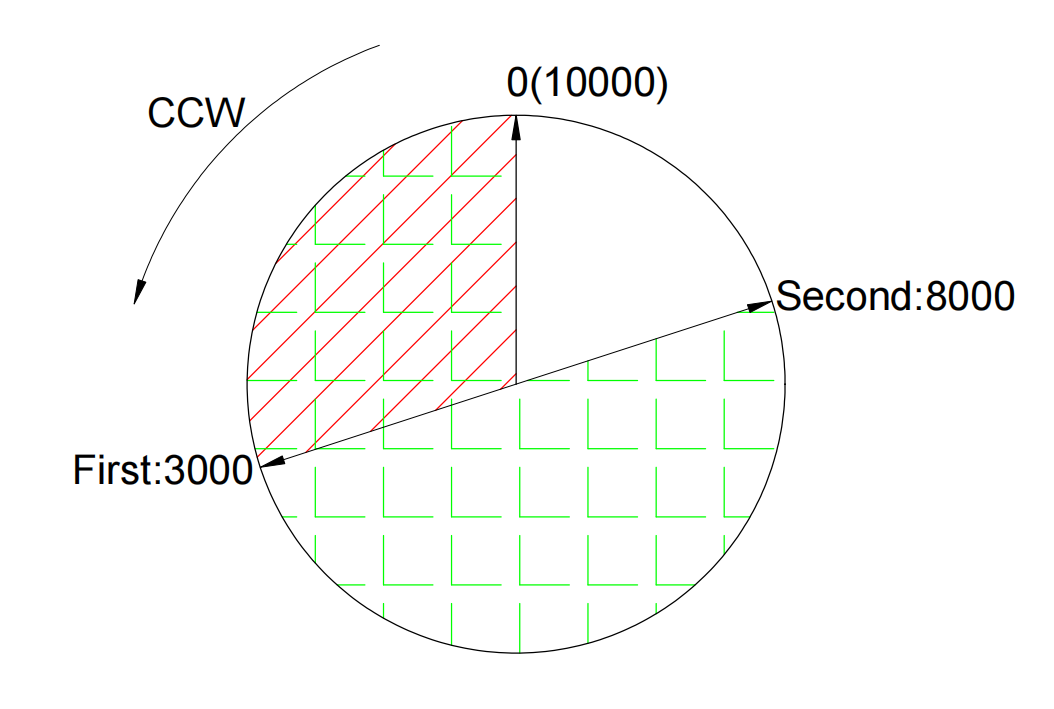
To operate in relative position mode instead, set C11.01=1. In this mode, the second movement starts from the 3000-pulse position and moves an additional 8000 pulses forward.
| Command | Description |
|---|---|
01 06 00 00 00 00 CRC CRC |
Set drive control mode to position mode (C00.00=0) |
01 06 03 00 00 01 CRC CRC |
Enable multi-segment position command (C03.00=1) |
01 06 11 00 00 00 CRC CRC |
Set single operation mode (C11.00=0) |
01 06 11 03 00 01 CRC CRC |
Set position profile starting group to Group 1 (C11.03=1) |
01 06 11 04 00 02 CRC CRC |
Set position profile ending group to Group 2 (C11.04=2) |
01 10 11 06 00 02 04 0B B8 00 00 CRC CRC |
Set Group 1 displacement to 3000 pulses (C11.06=3000) |
01 06 11 08 00 05 CRC CRC |
Set Group 1 running speed to 5 RPM (C11.08=5) |
01 10 11 0A 00 02 04 00 64 00 00 CRC CRC |
Set Group 1 acceleration time to 100 ms (C11.0A=100) |
01 10 11 0C 00 02 04 00 64 00 00 CRC CRC |
Set Group 1 deceleration time to 100 ms (C11.0C=100) |
01 10 11 0E 00 02 04 13 88 00 00 CRC CRC |
Set post-operation delay to 5000 ms for Group 1 (C11.0E=5000) |
01 10 11 10 00 02 04 1F 40 00 00 CRC CRC |
Set Group 2 displacement to 8000 pulses (C11.10=8000) |
01 06 11 12 00 01 CRC CRC |
Set Group 2 running speed to 1 RPM (C11.12=1) |
01 10 11 14 00 02 04 00 64 00 00 CRC CRC |
Set Group 2 acceleration time to 100 ms (C11.14=100) |
01 10 11 16 00 02 04 00 64 00 00 CRC CRC |
Set Group 2 deceleration time to 100 ms (C11.16=100) |
01 10 11 18 00 02 04 13 88 00 00 CRC CRC |
Set post-operation delay to 5000 ms for Group 2 (C11.18=5000) |
01 06 04 00 00 13 CRC CRC |
Configure DI1 as position profile trigger (C04.00=19, 0x13) |
01 06 04 11 00 01 CRC CRC |
Enable motor and start operation (C04.11=1) |
01 06 04 01 00 01 CRC CRC |
Trigger DI1 enable (C04.01=1) |
01 06 04 11 00 00 CRC CRC |
Emergency stop: disable motor (C04.11=0) |
01 06 04 01 00 00 CRC CRC |
Disable DI1 (C04.01=0) |
3. Common Commands
| Function | Command |
|---|---|
| Motor Enable | 01 06 04 11 00 01 CRC CRC |
| Motor Disable | 01 06 04 11 00 00 CRC CRC |
| Restore Factory Settings | 01 06 31 02 00 01 CRC CRC |
| Read Current Motor Speed | 01 03 40 01 00 02 CRC CRC |
| Read Current Absolute Position | 01 03 40 16 00 02 CRC CRC |
| Read Current Motor Torque | 01 03 40 03 00 02 CRC CRC |
| Read Drive Temperature | 01 03 40 30 00 02 CRC CRC |
Note on torque readings: The read value unit is 0.1%. For example, a reading of 1000 corresponds to 100.0%, which equals 1× the motor's rated torque.
Note on temperature readings: The read value unit is 0.1 °C.