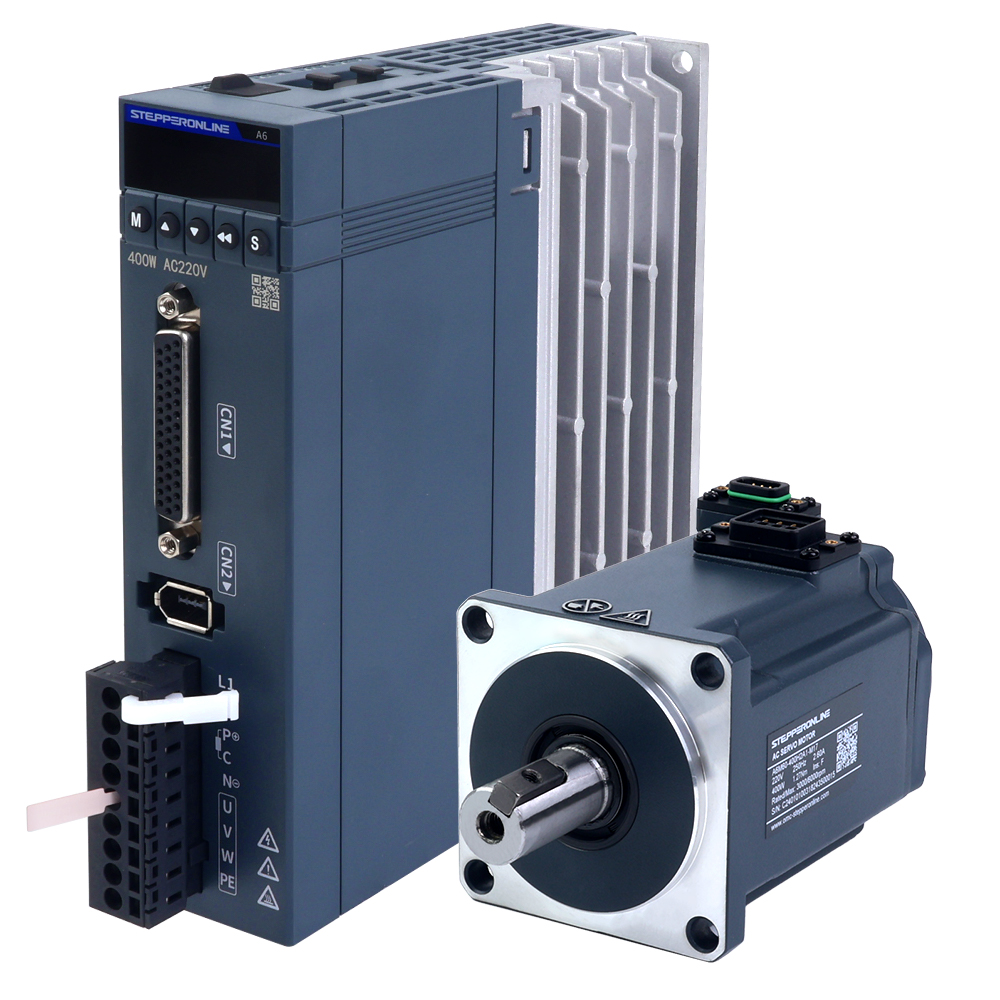
1. Wiring Inspection
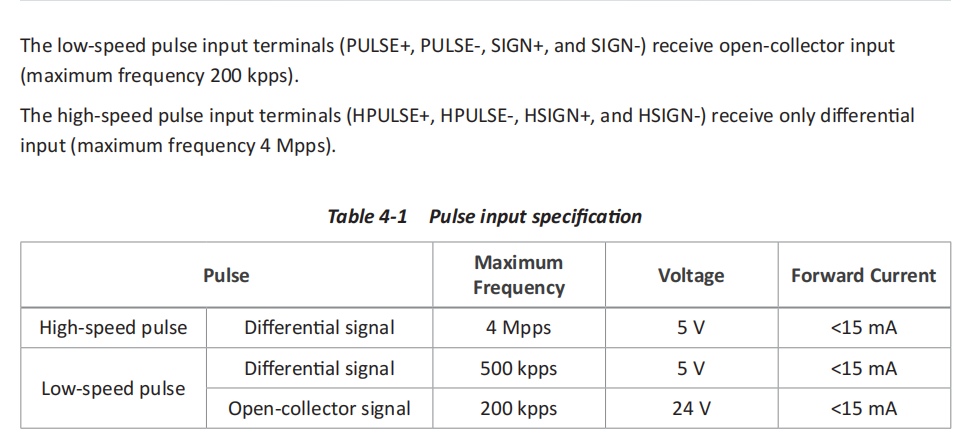
The A6-RS series supports pulse signal control from 5 V to 24 V. Before wiring, verify the output signal voltage of your controller (most small controller boards output 5 V, while most PLCs output 24 V). The wiring methods for each case are described below.
1.1. Wiring for a 5 V Pulse Signal
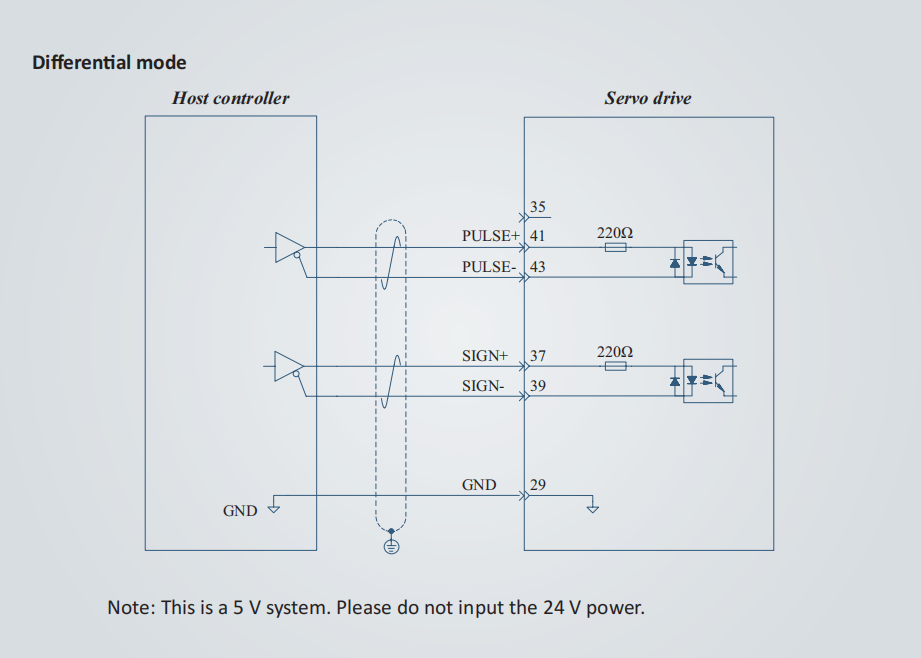
Please refer to Page 44 of the driver manual.
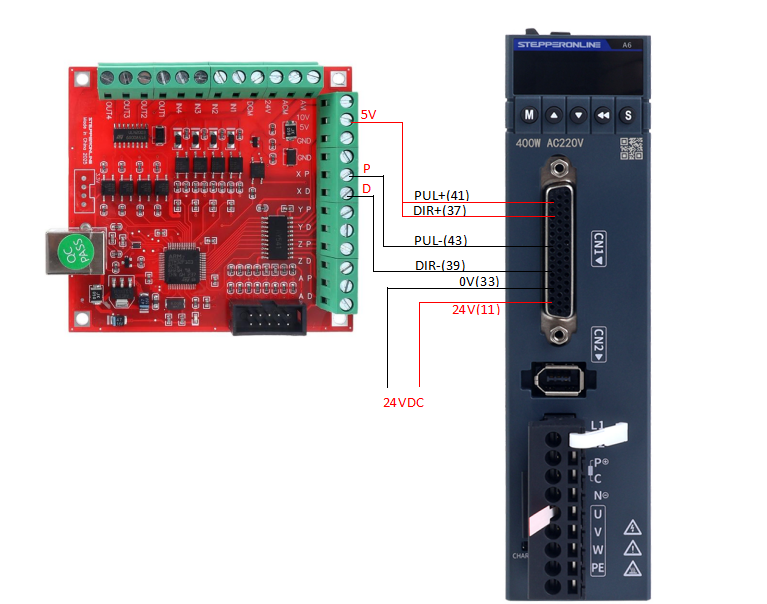
- Connect the controller's PULSE+ to PIN41 of the driver's CN1 connector.
- Connect the controller's PULSE- to PIN43 of the driver's CN1 connector.
- Connect the controller's DIR+ to PIN37 of the driver's CN1 connector.
- Connect the controller's DIR- to PIN39 of the driver's CN1 connector.
Note: Pin 29 (GND) is optional. Connecting it helps reduce signal interference in electrically noisy environments, but it may be left unconnected if interference is not a concern.
1.2. Wiring for a 24 V Pulse Signal
Please refer to Page 45 of the driver manual.
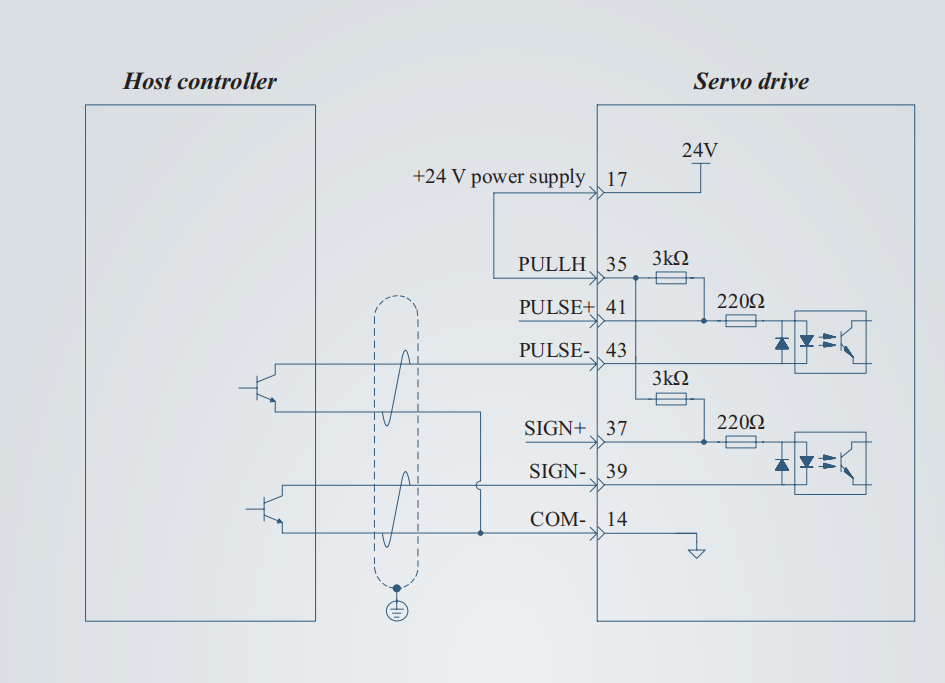
- Using the driver's internal 24 V supply, connect a jumper wire between PIN17 and PIN35 of the driver's CN1 connector.
- Connect the controller's pulse signal to PIN43 of the driver's CN1 connector.
- Connect the controller's direction signal to PIN39 of the driver's CN1 connector.
- Connect the controller's signal ground (GND) to PIN14 of the driver's CN1 connector.
Ensure all wiring matches the above instructions and that the controller is correctly outputting a 5 V or 24 V pulse signal (you can verify the voltage using a multimeter).
At this point, external wiring issues can generally be ruled out. Next, check whether the servo enable signal is active.
Servo Enable
The servo enable signal is a critical prerequisite for the motor to execute any motion command. If the servo is not enabled, the driver will not respond to commands from the controller, regardless of how many commands are sent.
For the A6-RS series driver, the enable function is assigned to digital input 5 (DI5).
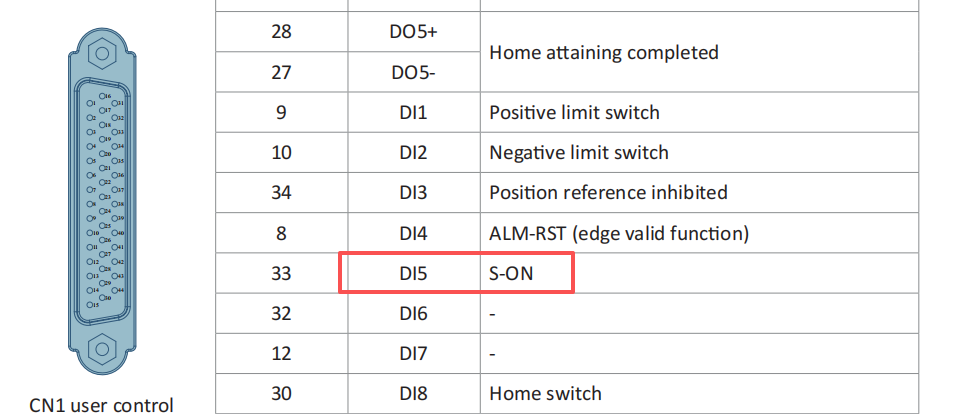
Enabling the driver essentially means triggering DI5. There are several methods; the simplest wiring approach is described first.
1) Control via an External 24 V Power Supply
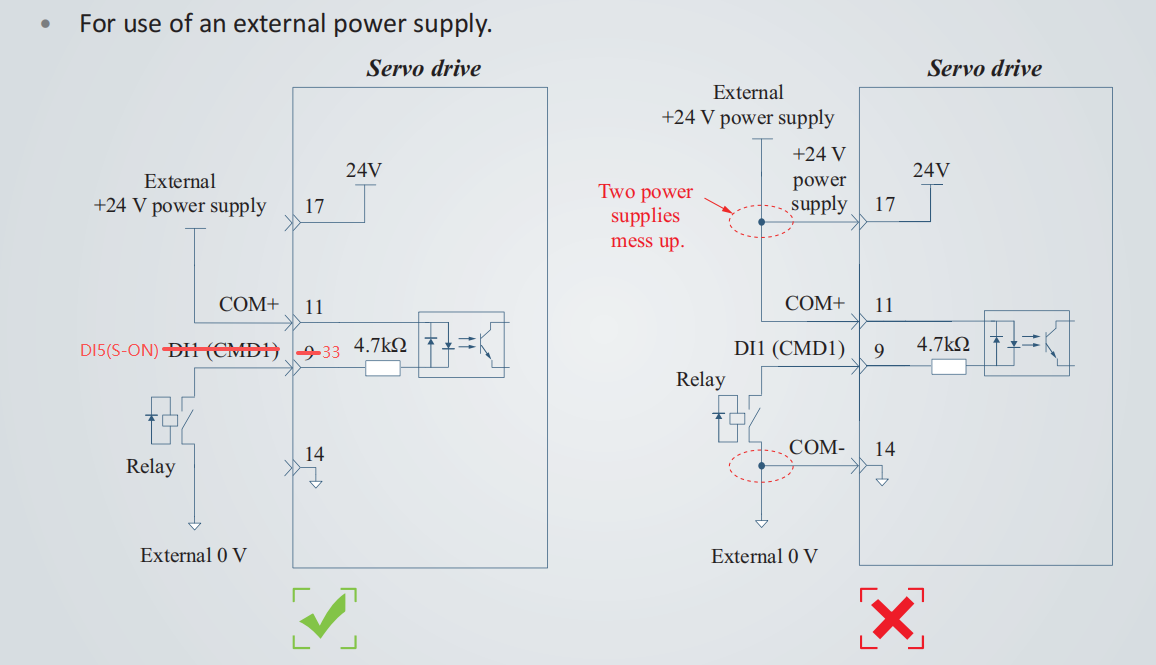
Prepare a 24 V DC power supply.
- Connect the 24 V+ to PIN11 of the CN1 connector.
- Connect the 0 V to PIN33 of the CN1 connector.
- When the power supply is energized, the servo is enabled. When it is turned off, the servo is disabled.
The diagram below shows the complete wiring between the A6-RS driver and an engraving machine controller board.
2) Control via Driver Parameters
If a suitable 24 V DC power supply is unavailable, the enable function can also be controlled through driver parameters. Using the driver's keypad or software, set parameter C04.11 to 1 to enable the driver, and set it to 0 to disable it.
3) Control Using the Driver's Internal 24 V Power Supply
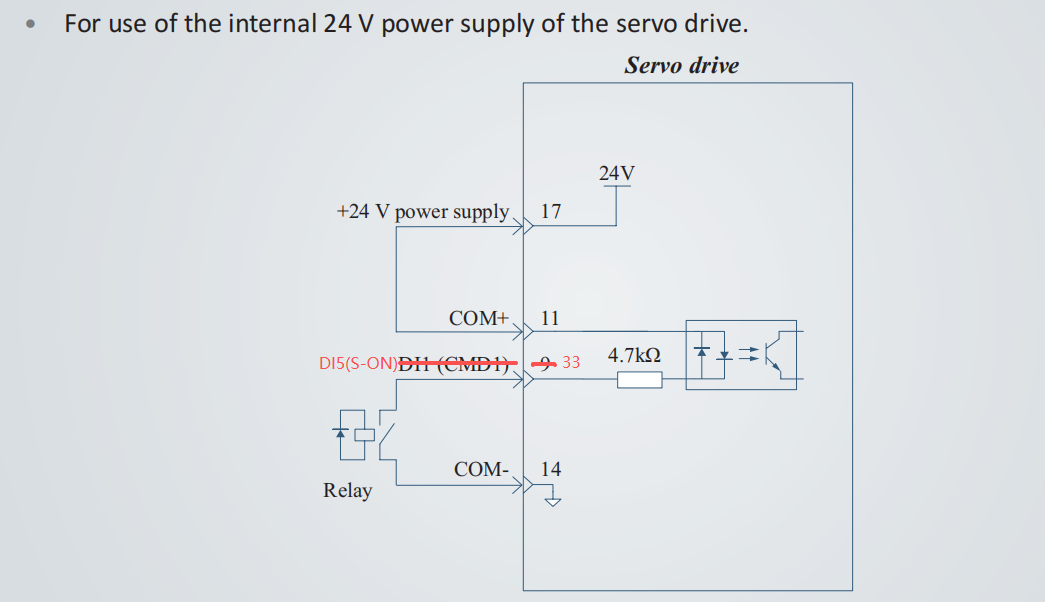
- Connect a jumper wire between PIN17 and PIN11 of the CN1 connector.
- Connect a jumper wire between PIN33 and PIN14 of the CN1 connector.
This method does not require an external 24 V DC power supply or manual parameter changes. However, it does not allow for easy on/off control of the enable signal. It is recommended to use an external relay for better manageability.
How to Determine if the Servo Is Successfully Enabled
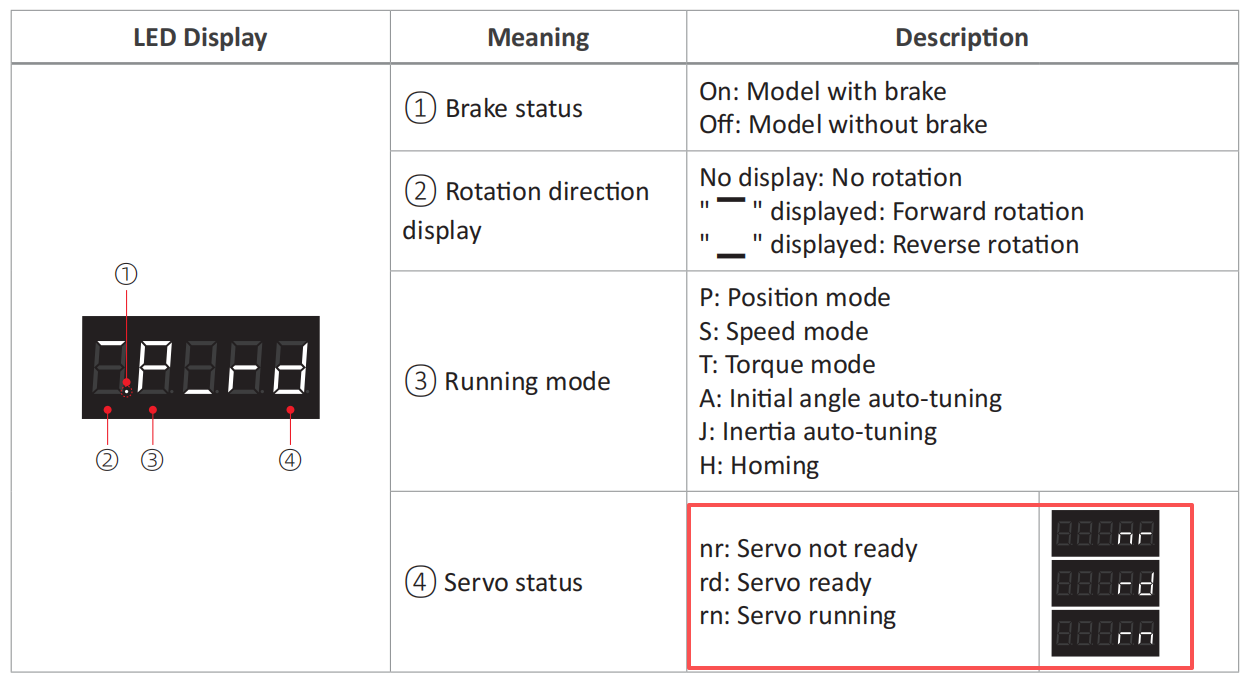
- Observe the Driver's Display Panel:
For the A6-RS series driver, after connecting the motor and powering on, the panel will display "P-rd". Once the servo is successfully enabled, the display will change to "P-rn".
- Manual Resistance Test:
When the servo is enabled, the driver will emit a faint sound, and the motor shaft will become locked. You will feel significant resistance when trying to turn the shaft by hand.
Please note: For motors equipped with brakes, if the brake is not released, the motor shaft cannot be turned by hand even when the servo is not enabled. For instructions on brake usage, please refer to: Brake Wiring Instructions for A6 Series Servo Motors
2. Driver Parameter Troubleshooting
Assuming the wiring is correct and the enable signal is active, proceed to verify the parameter settings.
1) Control Mode
Ensure the driver's control mode is set to Position Mode: C00.00 = 0.
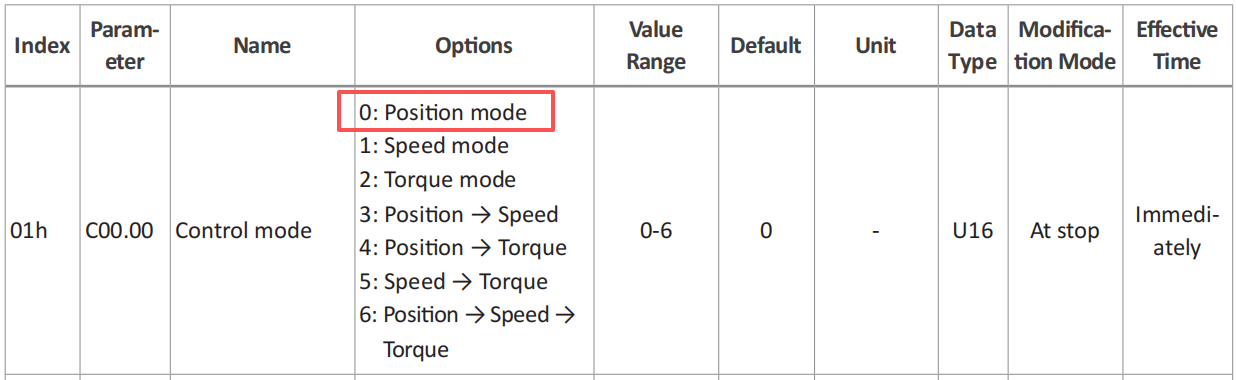
The driver's default factory setting is Position Mode. When powered on, the panel will display "P-rd", where the "P" indicates Position Mode. No additional setup is required under factory default conditions.
2) Position Command Source
Ensure the driver's position command source is set to Pulse Command: C03.00 = 0.

Similarly, the default factory setting for the position command source is Pulse Command. No adjustment is necessary under factory default conditions.
3) Pulse Channel Selection
As mentioned in the wiring instructions in Section 1, the Standard Channel is used by default: C00.22 = 0.

As with the previous parameters, no changes are required under factory default settings.
(Note: If you intend to use the High-Speed Channel, be aware that the corresponding pulse and direction signal inputs on connector CN1 change to pins 38/36/42/40.)
3. Cross-Testing
If the motor still fails to operate after eliminating the factors described in Sections 1 and 2, proceed with the following cross-tests for verification.
1) Verify the Motor Can Rotate Normally
Please refer to the instructions on Page 185 of the driver manual.
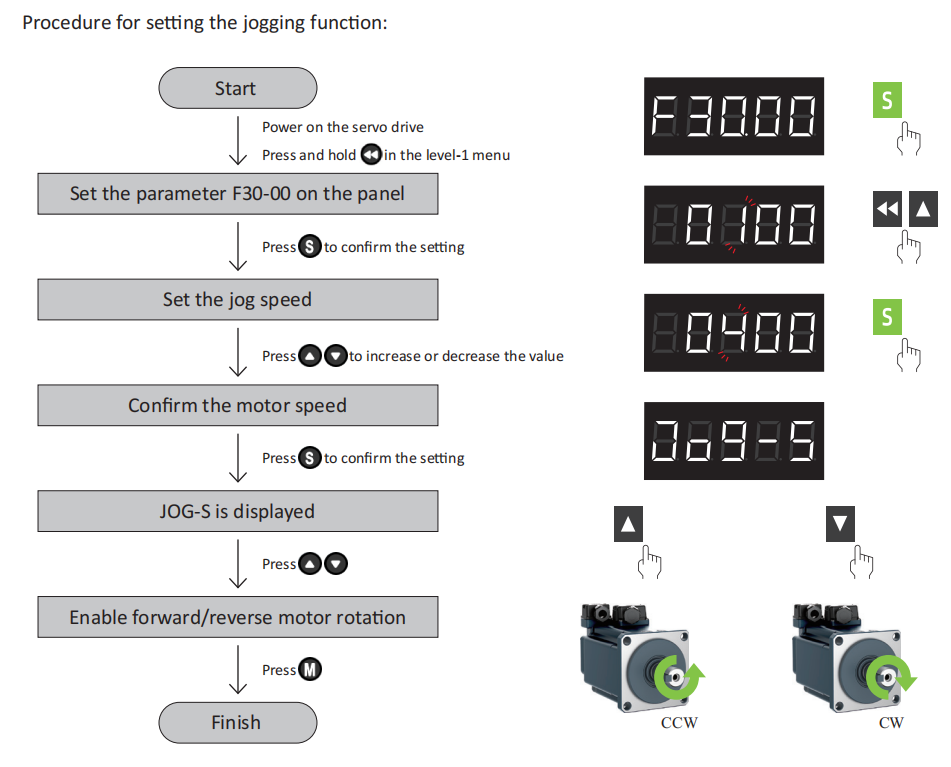
If the JOG operation functions normally, the motor itself can be ruled out as the cause.
2) Verify the Pulse Controller and Cabling
Keep the motor and driver unchanged. Connect the controller to another servo driver or stepper driver. Under identical settings, test whether the issue lies with the pulse controller or the signal cables.
3) Verify the Servo Driver
Keep the motor and controller unchanged. Replace the original driver with a known-good unit. If the motor operates normally, check whether the pulse input pins on the faulty driver are damaged (you can use a multimeter to test pin continuity). There is a high probability of pin damage if a 24 V pulse signal was accidentally connected to a 5 V system.
If the issue persists after carefully checking all the steps above, please contact us promptly and provide clear, relevant photos and video documentation.
4. Summary
Under normal circumstances, a newly unboxed A6-RS series servo motor can be made operational via pulse control by following these steps:
- Correctly wire the pulse and direction signals.
- Enable the driver.
- Release the brake (for motors equipped with one).