1. Initial Connection and Establishing Communication
Prerequisites
- A PR series stepper drive with the motor and power cables connected
- An RJ45 Ethernet cable
- An RS485-to-USB converter cable (if you are unsure which one to choose, we recommend our product: USB to RS422/RS485 Serial Port Converter Adapter Cable)
- Serial port software or a controller capable of sending RS485 commands
Wiring
Refer to the RS485 interface pin definition in the PR series stepper drive manual:
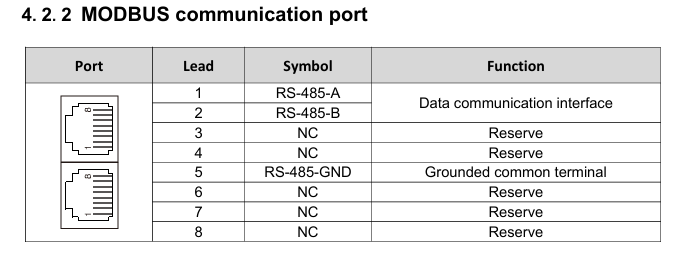
Compare this with the pinout of the RJ45 Ethernet cable:
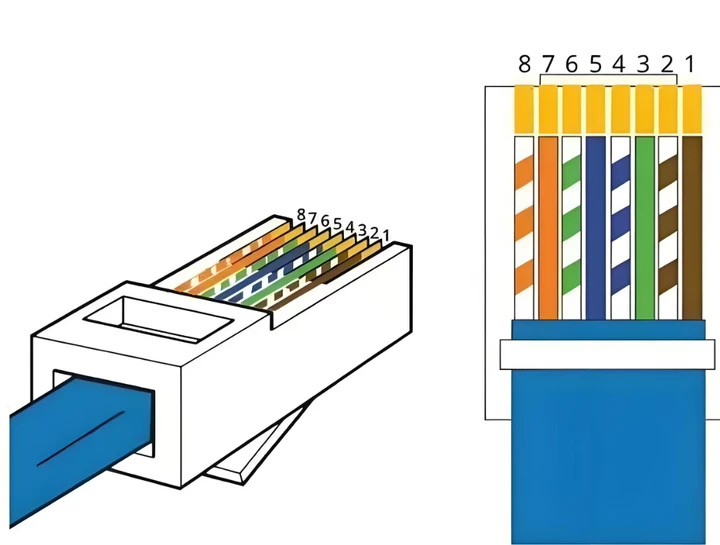
Wires 1, 2, and 5 are used to connect to the RS485-to-USB converter cable. For the RJ45 Ethernet cable, keep one end with the RJ45 connector to plug into the drive's CN3 port. Cut off the connector at the other end, strip wires 1, 2, and 5 (brown, brown-white, and blue), and connect them in the following order:
485+ ———————— TXD+ 485- ———————— TXD- GND ——————— GND
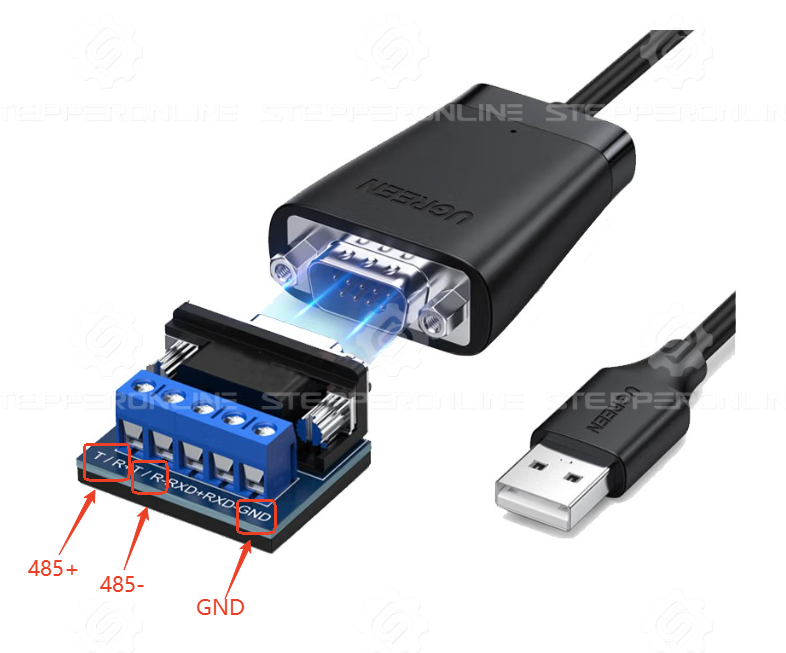
After wiring, plug the RJ45 connector into the drive and the USB connector into the PC. Power on the drive and open the serial port software to establish communication. (If communication cannot be established, please refer to this troubleshooting article.)
Note: Before entering any commands, set SW1 to ON and SW2–5 to OFF. This sets the RS485 address to 01.
To save the parameters you have written via RS485 commands, send the following command last:
01 06 00 2D 00 42 CRC CRC
Otherwise, the written parameters will revert to their default values after the drive is powered off.
When using speed mode, after saving parameters and restarting the drive, you must re-send a start command. The motor will not rotate immediately upon power-up.
2. Operation Modes
2.1 Speed Control Mode
| Command | Description |
|---|---|
| 01 06 00 2D 00 12 CRC CRC | Enable the motor (enabled by default; send this command first if the motor is disabled) |
| 01 06 00 1D 00 3C CRC CRC | Set running speed to 60 rpm |
| 01 06 00 1E 00 64 CRC CRC | Set acceleration time to 100 ms |
| 01 06 00 1F 00 64 CRC CRC | Set deceleration time to 100 ms |
| 01 10 00 27 00 02 CRC CRC | Start in speed mode |
| 01 10 00 27 01 00 CRC CRC | Stop command |
Command Breakdown
Take the command 01 06 00 2D 00 12 CRC CRC as an example:
- 01 — Axis address (set by SW1 = ON, SW2–5 = OFF)
- 06 — Write single register command
- 00 2D — Parameter register address
- 00 12 — Value to write
- CRC CRC — Checksum
Some serial port tools do not require a checksum, while others require manual calculation. Please verify the requirements of your tool.
Writing Multiple Registers with a Single Command
Multiple registers can sometimes be written with a single command. For example, the commands in rows 2–4 of the table above can be combined as:
01 10 00 1D 00 03 06 00 3C 00 64 00 64 CRC CRC
- 01 — Axis address (default is 1)
- 10 — Write multiple registers command
- 00 1D — Starting register address (subsequent addresses follow sequentially, each occupying two bytes)
- 00 03 — Number of registers to write
- 06 — Number of data bytes
- 00 3C — Running speed value
- 00 64 — Acceleration/deceleration time value
- CRC CRC — Checksum
2.2 Multi-Speed Operation
| Command | Description |
|---|---|
| 01 06 00 2D 00 12 CRC CRC | Enable the motor (enabled by default; send this command first if the motor is disabled) |
| 01 06 00 C0 00 0A CRC CRC | Set first-segment running speed to 10 rpm |
| 01 06 00 C1 00 64 CRC CRC | Set first-segment acceleration time to 100 ms |
| 01 06 00 C2 00 64 CRC CRC | Set first-segment deceleration time to 100 ms |
| 01 10 00 C3 00 C8 CRC CRC | Set second-segment running speed to 200 rpm |
| 01 10 00 C4 00 64 CRC CRC | Set second-segment acceleration time to 100 ms |
| 01 10 00 C5 00 64 CRC CRC | Set second-segment deceleration time to 100 ms |
| 01 10 00 45 00 0D CRC CRC | Set input terminal X4 as the PV trigger signal |
| 01 10 00 41 00 0E CRC CRC | Set input terminal X1 as PIN0 |
| 01 10 00 42 00 0F CRC CRC | Set input terminal X2 as PIN1 |
| 01 10 00 43 00 10 CRC CRC | Set input terminal X3 as PIN2 |
| 01 10 00 44 00 11 CRC CRC | Set input terminal X4 as PIN3 |
| 01 10 00 40 27 10 CRC CRC | Start at first-segment speed |
| 01 10 00 40 27 11 CRC CRC | Start at second-segment speed |
| 01 10 00 40 00 00 CRC CRC | Stop command |
Note: Some drive models only support input terminals X0–X3 (4 input signals in total). Therefore, speed segment selection supports up to 8 segments maximum.
2.3 Absolute Position Movement — 5000 Pulses (Default Setting: 10,000 Pulses/Rev)
| Command | Description |
|---|---|
| 01 06 00 2D 00 12 CRC CRC | Enable the motor (enabled by default; send this command first if the motor is disabled) |
| 01 06 00 20 00 0A CRC CRC | Set running speed to 10 rpm |
| 01 06 00 21 00 64 CRC CRC | Set acceleration time to 100 ms |
| 01 06 00 22 00 64 CRC CRC | Set deceleration time to 100 ms |
| 01 10 00 23 00 3C CRC CRC | Set maximum speed to 60 rpm |
| 01 10 00 24 00 00 CRC CRC | Set the high word of total pulses to 0 |
| 01 10 00 25 13 88 CRC CRC | Set the low word of total pulses to 5000 |
| 01 10 00 27 00 01 CRC CRC | Start in relative positioning mode |
| 01 10 00 27 01 00 CRC CRC | Stop prematurely |
Note: If the total pulse count you set is less than the minimum pulse count required based on the configured acceleration/deceleration time and maximum speed, the drive will not reach the configured maximum speed.
2.4 Multi-Segment Position Operation (First Segment: 1000 Pulses; Second Segment: 5000 Pulses)
Note: In this example, the first segment moves from the origin (0) to the 1000-pulse position, and the second segment moves an additional 5000 pulses from the first segment's end position. In multi-segment mode, register 0x0050 (Relative/Absolute Position Register) controls whether each position segment operates in relative or absolute positioning mode.
| Command | Description |
|---|---|
| 01 06 00 2D 00 12 CRC CRC | Enable the motor (enabled by default; send this command first if the motor is disabled) |
| 01 10 00 60 00 02 04 00 00 03 E8 CRC CRC | Set first-segment total pulses to 1000 |
| 01 06 00 62 00 32 CRC CRC | Set first-segment positioning speed to 50 rpm |
| 01 06 00 63 00 64 CRC CRC | Set first-segment acceleration time to 100 ms |
| 01 06 00 64 00 64 CRC CRC | Set first-segment deceleration time to 100 ms |
| 01 10 00 66 00 02 04 00 00 13 88 CRC CRC | Set second-segment total pulses to 5000 |
| 01 06 00 68 00 64 CRC CRC | Set second-segment positioning speed to 100 rpm |
| 01 06 00 69 00 64 CRC CRC | Set second-segment acceleration time to 100 ms |
| 01 06 00 70 00 64 CRC CRC | Set second-segment deceleration time to 100 ms |
| 01 06 00 45 00 0C CRC CRC | Set input terminal X4 as the PT trigger signal |
| 01 06 00 41 00 0E CRC CRC | Set input terminal X1 as PIN0 |
| 01 06 00 42 00 0F CRC CRC | Set input terminal X2 as PIN1 |
| 01 06 00 43 00 10 CRC CRC | Set input terminal X3 as PIN2 |
| 01 06 00 44 00 11 CRC CRC | Set input terminal X4 as PIN3 |
| 01 06 00 40 27 10 CRC CRC | Start first-segment positioning |
| 01 06 00 40 00 00 CRC CRC | Clear the PT trigger signal |
| 01 06 00 40 27 11 CRC CRC | Start second-segment positioning |
| 01 06 00 40 00 00 CRC CRC | Stop command |
Note:
- When using PIN terminals for segment selection, the signal must remain valid for at least 5 ms before and 5 ms after the PT trigger signal.
- Some drive models only support input terminals X0–X3 (4 input signals in total), so position segment selection supports up to 8 segments maximum.
3. Common Commands
Motor Enable:
01 06 00 2D 00 12 CRC CRC
Motor Disable:
01 06 00 2D 00 11 CRC CRC
Restore Factory Settings:
01 06 00 2D 00 41 CRC CRC
Save All Parameters:
01 06 00 2D 00 42 CRC CRC
Stop Command:
01 06 00 27 01 00 CRC CRC
Emergency Stop Command:
01 06 00 27 02 00 CRC CRC
Set Motor Maximum Effective Current to 150 mA:
01 06 01 02 05 DC CRC CRC