Smooth operation is crucial for servo motors. When commissioning a new motor, failing to adjust the relevant gain parameters will likely result in vibration. So how can you reduce or even eliminate motor vibration? The following three methods can help.
1. Adjusting the Inertia Ratio and Stiffness
The load inertia ratio is the ratio of the total moment of inertia of the load to the motor's own rotor inertia. This is a key parameter in any servo system, and setting it correctly helps streamline the commissioning process.
The load inertia ratio (C00.06) can be set manually by calculating the mass and geometry of each mechanical component, but this process is tedious. The more complex the mechanical system, the harder it is to calculate the load inertia ratio accurately. STEPPERONLINE A6 series servo drives feature an automatic inertia identification function that performs this calculation automatically via parameter F30.10, eliminating the need for complex manual calculations.
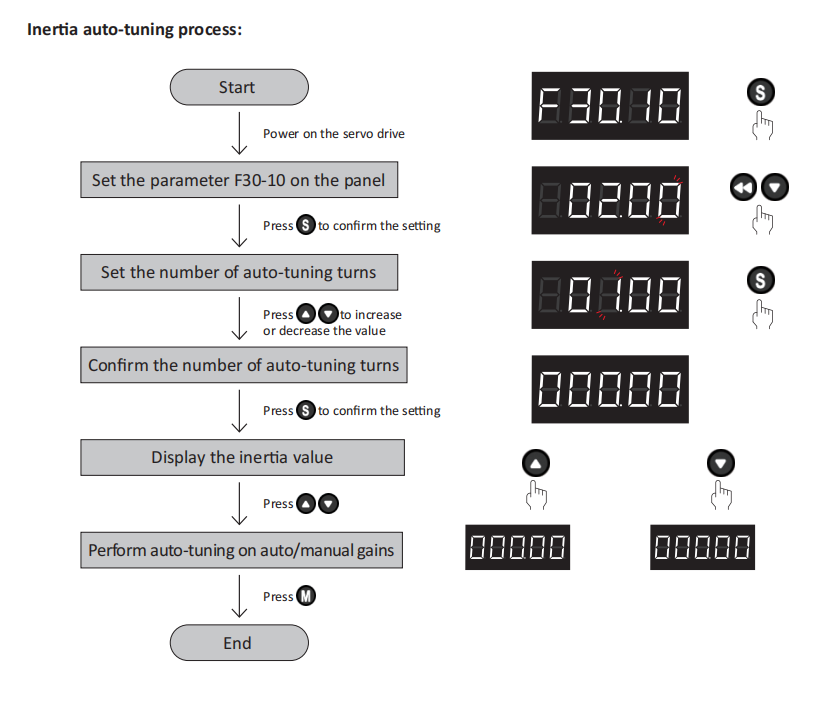
As shown in the figure above, during the identification process, the drive rotates the servo motor in the forward and reverse directions multiple times to determine the load inertia ratio.
Once inertia identification is complete, proceed to set the stiffness:
The higher the stiffness level of the servo system, the higher the gain and the faster the response. However, excessive stiffness can cause vibration. Level 0 represents the lowest stiffness and Level 31 the highest. Adjust the stiffness up or down as needed based on your actual application.

2. Using the Drive's Auto-Tuning Feature
The A6 servo drive offers three auto-tuning modes:
- 0 – Manual mode
- 1 – Standard mode
- 2 – Positioning mode

If automatic gain adjustment does not achieve the desired result, you can manually fine-tune the gains for further optimization. The key gain parameters are explained below.
C01.00: Position Loop Gain
A higher position loop gain increases responsiveness and shortens positioning time. However, the position loop gain must not exceed the natural frequency limit of the mechanical system.
To ensure system stability, the speed loop bandwidth (Hz) should be 3 to 5 times the position loop bandwidth (Hz).
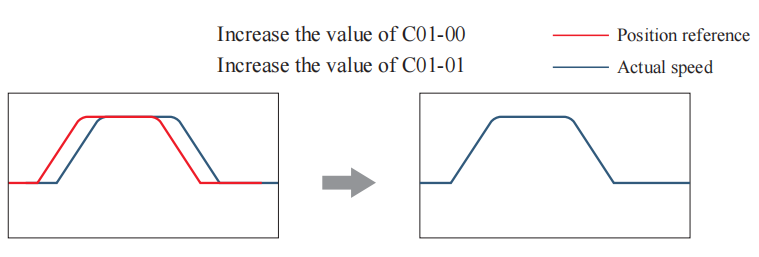
C01.01: Speed Loop Gain
If the speed loop has low responsiveness, it introduces a delay into the outer position loop, which can lead to overshoot or oscillation in the speed command. Therefore, within the range where the mechanical system does not vibrate, a higher value generally improves responsiveness and stability.
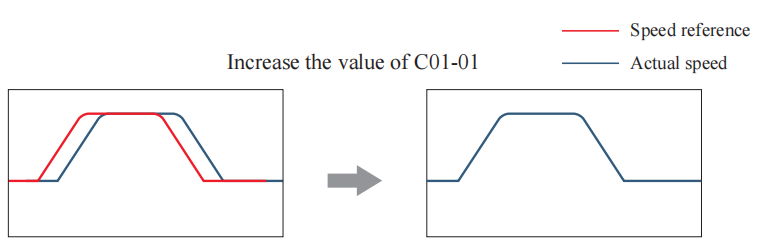
C01.03: Torque Command Filter Cut-off Frequency
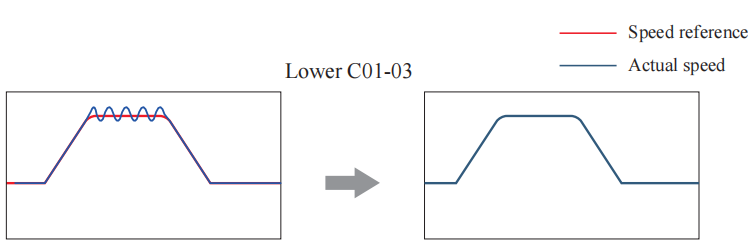
This parameter applies a low-pass filter to the torque command. The set value defines the cut-off frequency of the filter. A lower value provides stronger filtering; however, setting it too low introduces excessive delay in the speed loop, thereby reducing the speed loop bandwidth.
When the machine vibrates, reducing this parameter value appropriately may help eliminate the vibration.
3. Using the Drive's Vibration Suppression Function
The A6 drive provides 5 notch filters, each with 3 parameters: notch frequency, width level, and depth level. The first and second notch filters can be set manually or configured as adaptive notch filters (C01.30 = 1 or 2). In adaptive mode, the drive sets the parameters automatically. The remaining three notch filters are configured manually. A notch filter suppresses mechanical resonance by attenuating the gain at a specific frequency. Once the notch filter is properly configured, vibration can be effectively suppressed, allowing you to further increase the servo gain.
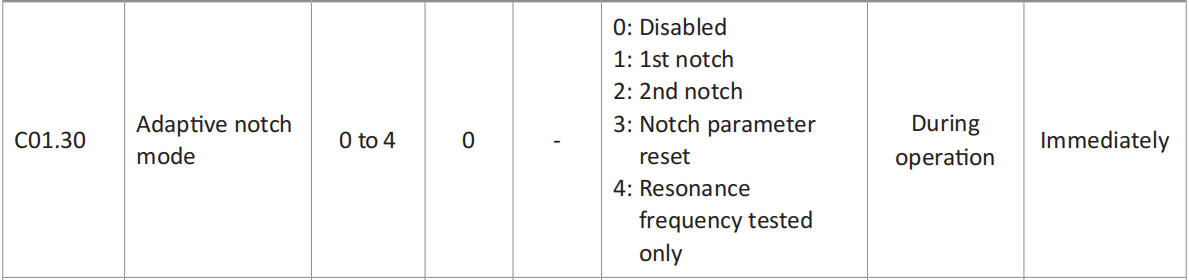
Adaptive Notch Filter Setup Steps
- Set C01.30 (Adaptive Notch Filter Mode Selection) to 1 or 2 depending on the number of resonance points.
- When resonance occurs, set C01.30 to 1 first to enable one adaptive notch filter. After the gain is adjusted, if a new resonance appears, set C01.30 to 2 to enable two adaptive notch filters. During servo operation, the parameters of the first and second notch filters are updated automatically.
- If the resonance is suppressed, the adaptive notch filter has achieved the desired result. If resonance persists, use the background software tool to observe the waveforms of the relevant variables, and use the remaining three manual notch filters to further suppress the resonance.
These methods are effective for eliminating vibration in A6 servo motors. For more details, please refer to the corresponding user manual:
A6-RS Manual – Chapter 6: https://www.omc-stepperonline.com/index.php?route=product/product/get_file&file=5101/A6-RS%20series%20servo%20drive%20manual.pdf
A6-EC Manual – Chapter 7: https://www.omc-stepperonline.com/index.php?route=product/product/get_file&file=5071/A6-EC%20series%20servo%20drive%20manual.pdf
A6-PN Manual – Chapter 6: https://www.omc-stepperonline.com/index.php?route=product/product/get_file&file=5088/A6-PN%20series%20servo%20drive%20user%20manual.pdf
If you have any further questions, please feel free to contact us.