The stop mode on servo enable loss determines how the drive responds when the servo enable signal is removed (e.g., during a power interruption). Before configuring this parameter, clarify the purpose of your test:
Scenario 1: You intend to use power cut-off as an emergency stop method.
Scenario 2: You want to observe load behavior after a power loss to prepare for unexpected power failures in the work environment.
Recommendations
For Scenario 1: We do not recommend using power cut-off as an emergency stop method. Instead, use a Digital Input (DI) command to trigger an emergency stop. Alternatively, the Safety Torque Off (STO) function available on this drive can also fulfill this requirement.
For Scenario 2: The servo motor's stopping behavior upon servo enable loss can be configured using the following parameter:
-
C05.00 Stop Mode on Servo Enable Loss
-
C05.00 = 0: Coast stop (free run). The motor is unpowered and coasts freely until it stops due to friction and load inertia.
-
C05.00 = 1: Controlled deceleration to stop, then the servo is disabled (motor free).
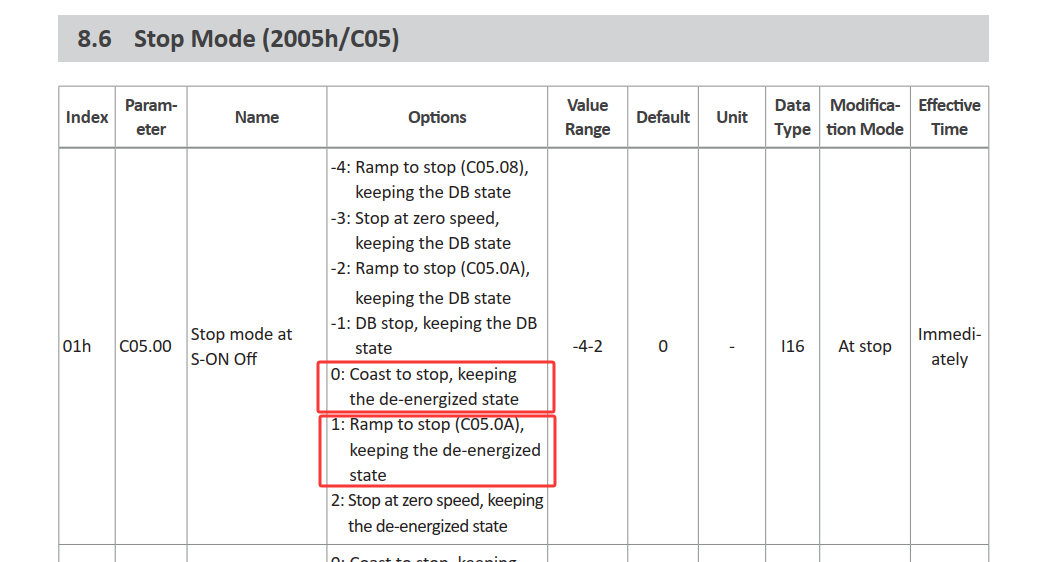
Parameter Details:
-
C05.00 = 0: The motor coasts to a stop without any active braking or deceleration control. Stopping time depends on load inertia and friction.
-
C05.00 = 1: The drive decelerates the motor to a stop using a controlled ramp, then disables the servo. The deceleration rate can be adjusted via parameter C05.08 (Quick Stop Deceleration Time). It is critical to test and determine a suitable deceleration value based on actual load conditions to ensure the load does not cause damage to the equipment after an unexpected power loss.