First, it is important to understand that the whining sound from a servo motor is essentially a high-frequency vibration. This high-frequency vibration is transmitted through the motor structure and surrounding air, producing an audible whining or squealing noise. The primary causes are as follows:
1. Mechanical Resonance (The Most Common Cause)
- Insufficient Connection Stiffness: The connection between the motor and the load (e.g., ball screw, belt, gear) lacks stiffness.
- Solution: Ensure that couplings, timing belts, gears, and other connecting components between the motor and load are securely fastened without any looseness or backlash. Replace or adjust connections that have play.
- Weak or Loose Mounting Base: The mounting baseplate for the motor and load has insufficient stiffness or is not firmly fixed.
- Solution: Ensure the mounting baseplate has adequate stiffness and that all mounting bolts are tightened to the specified torque. If necessary, add reinforcing ribs or use a thicker mounting plate.
- Low Natural Frequency of the Load Structure: The load itself has a low inherent design frequency.
- Solution: If the structure allows, try adding damping materials (e.g., rubber pads) or mass blocks to the motor or load to shift the natural frequency of the entire mechanical system away from the range that excites the whine.
2. Improper Servo Gain Tuning
- Excessive Stiffness (Gain Too High): To increase response speed, the speed loop gain or position loop gain is set too high. This causes the motor to "overreact," continuously making micro-corrections, leading to high-frequency oscillation and whining. This is commonly encountered during commissioning.
- Insufficient Stiffness (Gain Too Low): While less likely to cause high-frequency whining, it can result in sluggish system response, overshoot during positioning, and other issues.
Solutions:
- Check parameter C00.05 (Control Mode Selection) to confirm the drive is operating in the correct control mode. Incorrect control mode settings can contribute to instability and noise.
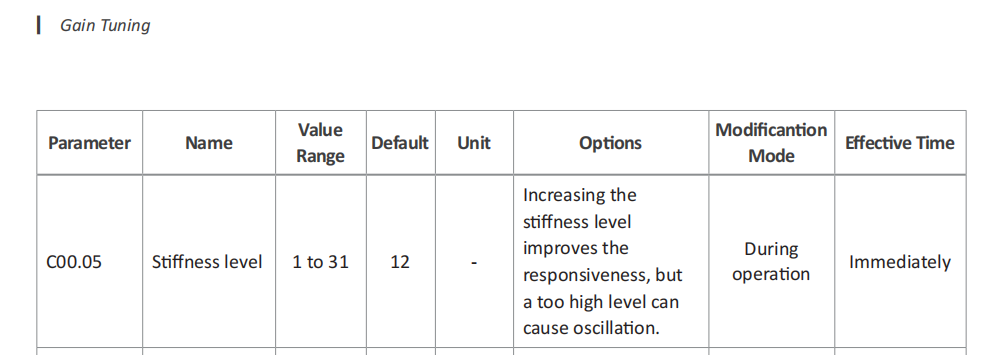
- Try reducing the Speed Loop Gain (C01.01). This parameter has the most significant impact on noise. Decrease it in small increments (e.g., 10%–20%) and observe whether the whine improves. If the response becomes too slow or following error appears after reduction, fine-tune the Speed Loop Integration Time Constant (C01.02) and Position Loop Gain (C01.00) accordingly to compensate.
- Use the Notch Filter: The A6 servo drive typically has a built-in Adaptive Notch Filter. This function automatically detects and suppresses specific resonant frequencies. It is highly recommended to enable this feature. It automatically identifies the system's resonance point and provides significant attenuation at that frequency, effectively eliminating the whine. For notch filter settings, please access the software as shown in the following operation guide:
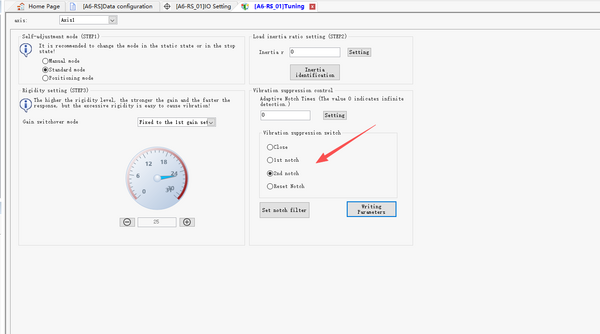
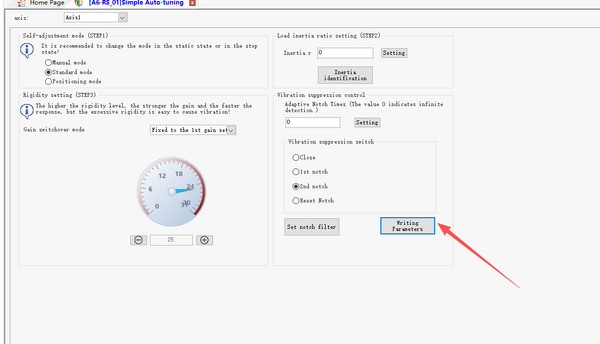
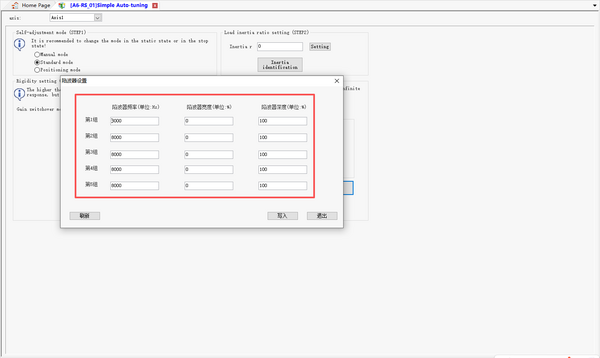
In summary, when encountering an A6 servo whine:
- First, inspect the mechanical installation for stiffness and tightness.
- Then, access the A6 drive software, enable the Adaptive Notch Filter, and appropriately reduce the Speed Loop Gain (C01.01).
- If the noise remains unacceptably loud after the above steps, you may consider increasing the carrier frequency (PWM switching frequency). Note: A higher carrier frequency increases drive heat dissipation and electromagnetic interference (EMI). Ensure the value does not exceed the maximum specified in the A6 user manual, and verify adequate cooling and EMC compliance.