Follow these steps to connect a stepper driver to an Arduino.
Wiring Steps
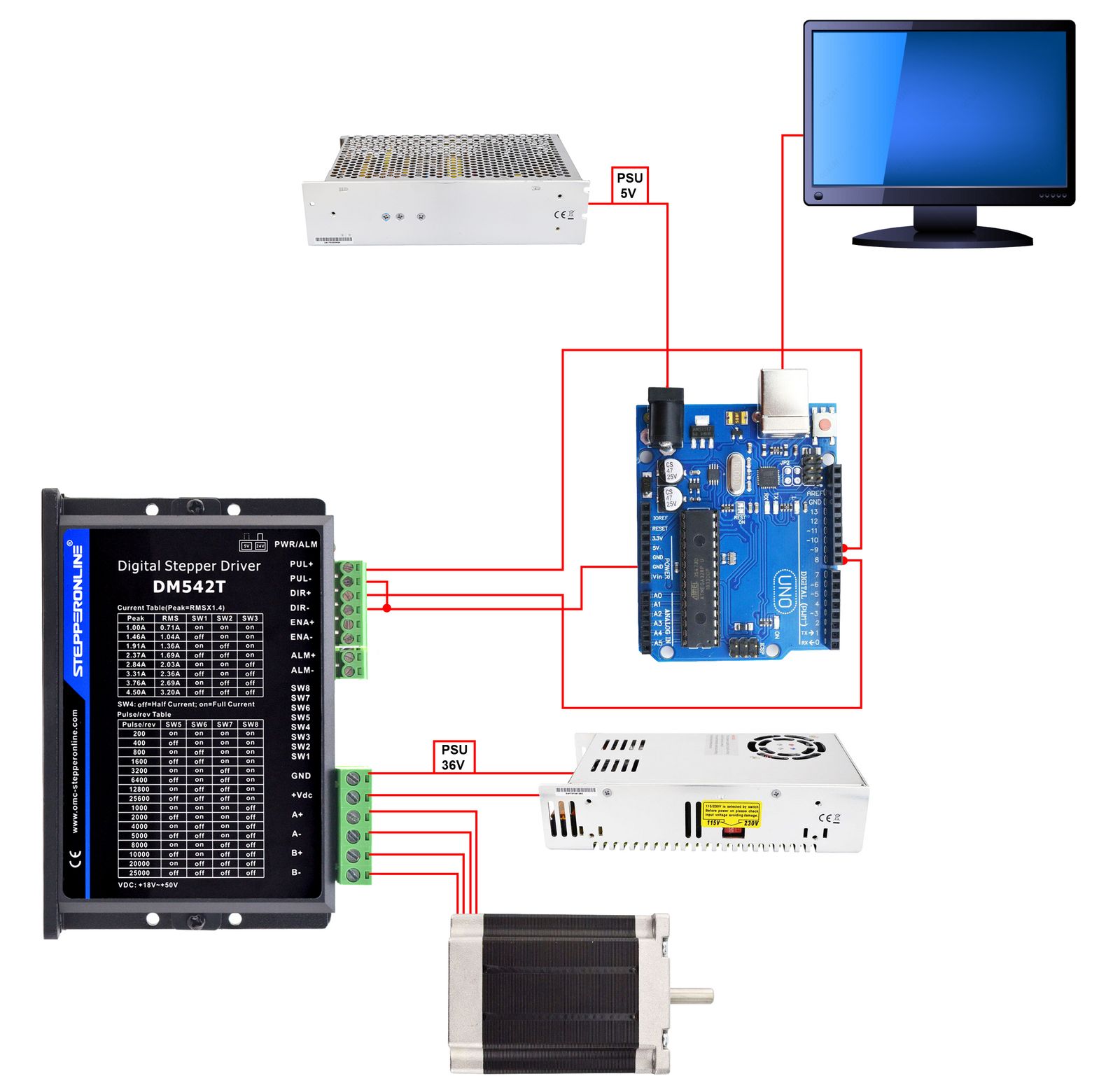
- Connect the driver's PUL+ and DIR+ pins to Arduino digital pins. For example, use Pin 9 for PUL+ and Pin 8 for DIR+.
- Connect the driver's PUL− and DIR− pins to the Arduino GND pin to establish a common ground.
- Write a program on your computer that assigns Pin 9 as the pulse (PUL) output and Pin 8 as the direction (DIR) output.
- Upload the program to the Arduino and power the Arduino via a 5 V power supply.
Important: Make sure the Arduino and the stepper driver share a common ground (GND). Verify that all voltage levels are compatible before powering on the system.
Schematic
The schematic below shows the basic wiring among the Arduino, stepper driver, power supply, and stepper motor.
Example Code
int x;

void setup() {
  pinMode(9, OUTPUT); // Pin 9 as PUL (pulse)
  pinMode(8, OUTPUT); // Pin 8 as DIR (direction)
}

void loop() {
  digitalWrite(8, HIGH); // Set direction: HIGH
  for (x = 0; x < 400; x++) { // 400 steps (one revolution at 400 pulses/rev driver setting)
    digitalWrite(9, HIGH);
    delayMicroseconds(500); // Controls rotation speed
    digitalWrite(9, LOW);
    delayMicroseconds(500); // Controls rotation speed
  }
  delay(1000); // Pause for 1 second

  digitalWrite(8, LOW); // Set direction: LOW
  for (x = 0; x < 400; x++) {
    digitalWrite(9, HIGH);
    delayMicroseconds(500);
    digitalWrite(9, LOW);
    delayMicroseconds(500);
  }
  delay(1000); // Pause for 1 second
}
Code Explanation
- The
pinMode()function configures Pin 9 as the pulse (PUL) output and Pin 8 as the direction (DIR) output. - The
loop()function contains twoforloops that each command 400 steps. The first loop sets DIR to HIGH and rotates the motor in one direction; the second loop sets DIR to LOW and rotates it in the opposite direction. ThedigitalWrite()anddelayMicroseconds()functions together generate the pulse train and control the rotation speed. - A
delay(1000)call after eachforloop pauses the program for 1 second before reversing direction.