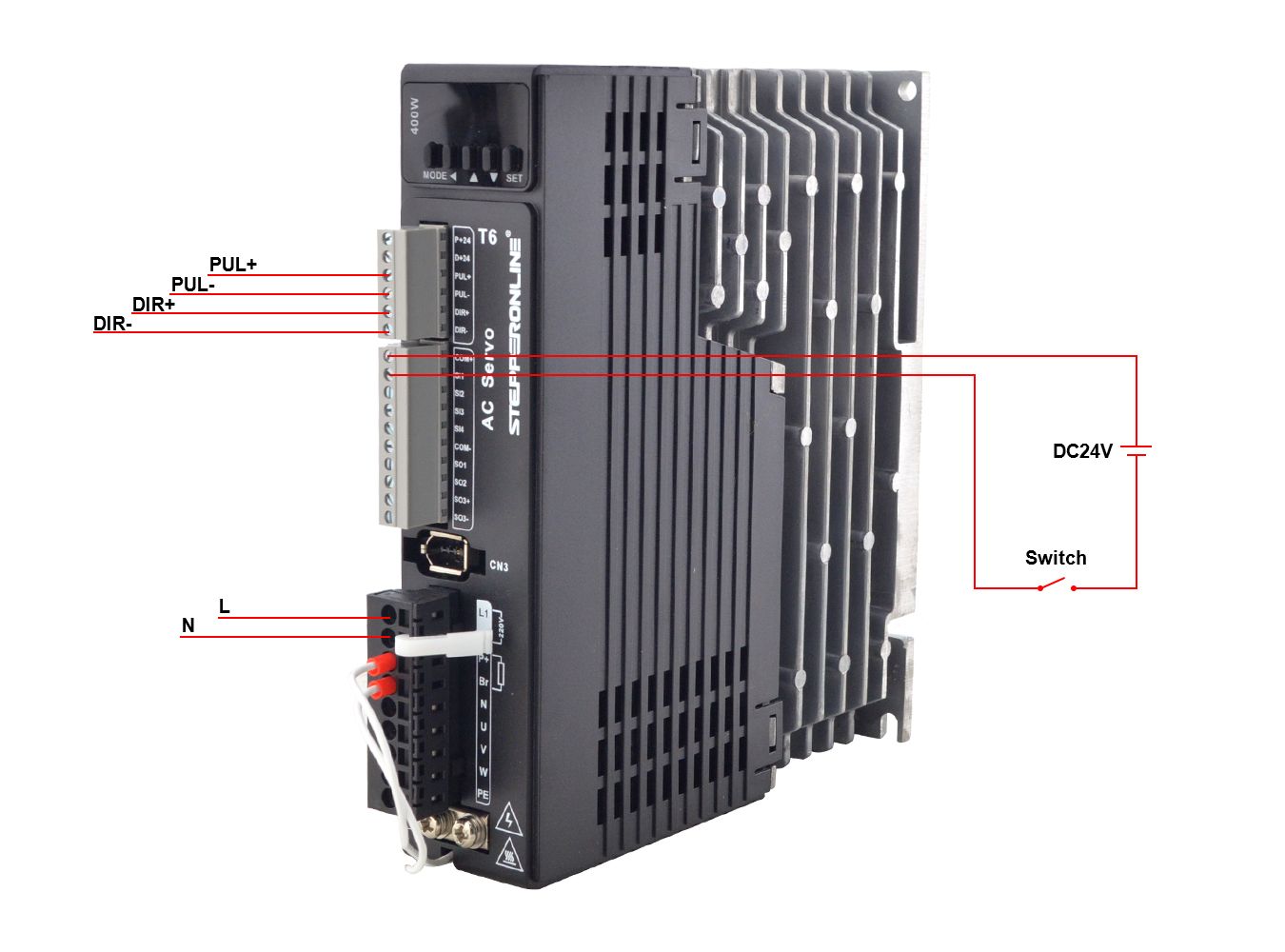
This article explains how to control the position of a T6 servo motor using an external 5V pulse input in Pulse + Direction mode.
Hardware Required
- T6 servo driver and servo motor
- External controller (e.g., PLC or motion controller)
- DC 24V switching power supply
- Switch
Function Description
In Pulse + Direction mode, the T6 servo driver receives position commands via 5V pulse signals and rotation direction via 5V direction signals through the CN1 connector:
- Pulse signal (PUL+/PUL-): Connect to CN1 pins 3 and 4. The pulse frequency determines the motor speed, and the total number of pulses determines the travel distance (position).
- Direction signal (DIR+/DIR-): Connect to CN1 pins 5 and 6. The logic level of this signal determines whether the motor rotates clockwise or counterclockwise.
Implementation Steps
Important: Always disconnect power before wiring or modifying connections.
-
Configure parameters on the T6 driver:
Parameter Value Description Pr0.01 0 Control Mode: Position Control Pr0.06 0 Default setting Pr0.07 3 Pulse Input Mode: Pulse + Direction Pr0.08 10000 Electronic Gear Ratio Pr4.00 3 Input signal configuration -
Power cycle the driver — turn the power off, then turn it back on — to apply the new parameter settings. After the parameters take effect, turn the power off again before proceeding with wiring.
-
Wire the control signals:
- Connect the 5V pulse signal from the external controller to CN1 pins 3 (PUL+) and 4 (PUL-).
- Connect the 5V direction signal from the external controller to CN1 pins 5 (DIR+) and 6 (DIR-).
- Connect the DC 24V power supply through a switch to the SI1 (Servo Enable) terminal.
-
Power on the system for testing.
-
Activate the servo — before running the motor, turn on the switch connected to SI1 to enable the servo.
-
Send pulse and direction signals from the external controller to command the motor position and rotation direction.
Video Demonstration
The following video shows the T6 servo motor performing position control via 5V pulse input: