The A6-RS series servo motors support analog control. We have provided a simple instructional video for your reference: https://help.stepperonline.com/en/article/practical-demonstration-of-multi-speed-analog-speed-control-functions-on-a6-rs-series-ac-servo-motor-12kcdx0/
In the video, we demonstrate how to control the acceleration, deceleration, and speed of the servo motor using analog signals from a potentiometer. But how can the rotation direction be controlled in real time? We recommend the following solution: use an external switch to control the direction via one of the servo driver's DI ports. The specific steps are as follows:
-
Select any DI function port and set its function to 17 (Speed Command Direction). The A6-RS series is configured with 8 DI input ports; you can choose any one. For this example, we will use DI6.
-
Locate the pin positions for your chosen DI port (e.g., DI6) and the DI common terminal (COM) on the driver's CN1 connector. Referring to the diagram below, identify the corresponding pins—for example, PIN14 (for DI6) and PIN32 (for COM).
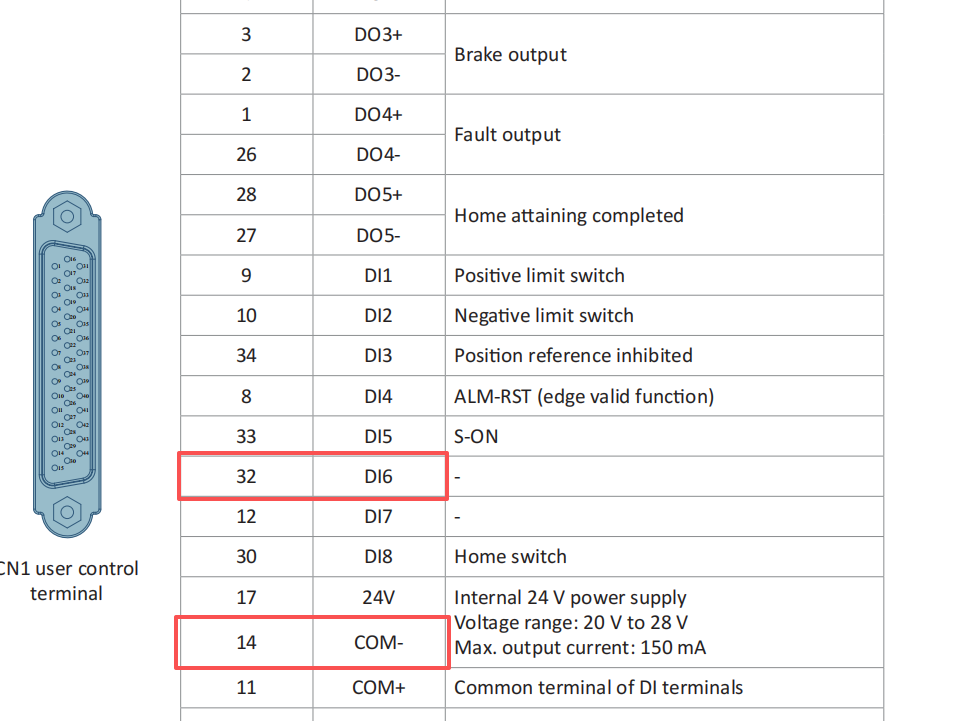
(Note: Because we are using the driver's internal 24V power supply for the DI ports, you must also short-circuit PIN17 and PIN11.)
- Connect one terminal of your switch to PIN32 (COM) and the other terminal to PIN14 (DI6).
This completes the wiring for direction control. When the servo motor is running, you can change the rotation direction at any time by toggling the external switch on or off.